Key takeaways
- HEIC was 18% smaller at a typical quality, not 50%. To match a JPEG saved at quality 85, HEIC needed a median 82% of the bytes (middle half of photos: 71–93%) and was smaller in 23 of 25 photos.
- The saving grows as quality drops. Against JPEG quality 60 the median HEIC was 42% smaller; against quality 92, 12% smaller. AVIF landed close to HEIC (80% at q85); lossy WebP was 5% larger than the JPEG.
- “Half the size” is what SSIM says. By SSIM, HEIC needed 53% of the bytes; by a perceptual metric (SSIMULACRA2) it needed 82%. Different yardsticks give different answers, and we show both.
- It does not always win. HEIC was larger than the JPEG in 2 of 25 photos (up to 1.33×), and it lost more when re-saved: five further saves cost 8.7 score points against 1.8 for JPEG.
- Compatibility is the real price. Only Safari 17 and later displays HEIC natively, about 16.9% of users; WebP is at 97.1%. Most uploads and print services still expect JPEG.
On this page
- The short answer
- File size at equal quality: the measurement
- Why “half the size” is only sometimes true
- What it looks like
- Where HEIC does not win
- Colour depth, HDR and gain maps
- Compatibility
- Live Photos, metadata, transparency
- Editing and generation loss
- Licensing and patents
- Print, web and upload workflows
- Which should you use?
- How we measured
The short answer
Keep photos as HEIC where you control the software, such as an iPhone, a Mac or iCloud, and send JPEG to everyone else. HEIC's saving is real but smaller than the “half the size” you will see repeated: in our measurements it was 12% to 42% depending on how much quality you ask for, and for two photos it was negative. The compatibility gap is larger than the size gap.
- 18%
- smaller than JPEG q85
- 42%
- smaller than JPEG q60
- 12%
- smaller than JPEG q92
- 16.9%
- of users open HEIC natively
median of 25 photos, same SSIMULACRA2 score
the gap is widest at low quality
and narrow at high quality
WebP: 97.1%. Source: Can I use data of 11 October 2026
File size at equal quality: the measurement
Comparing “a HEIC” with “a JPEG” means nothing unless they look equally good, so we did not compare settings. For each of 25 photographs we encoded every format at many quality settings, scored each result against the uncompressed original, and read off how many bytes each format needs to reach a given score. The anchor is a JPEG saved at a familiar quality (60, 75, 85 or 92). The question is how large a HEIC, AVIF or WebP has to be to score the same on SSIMULACRA2 (opens in a new tab), a perceptual metric where 70 means “high quality, artefacts perceptible but not annoying” and 90 means “visually lossless”.
| Match a JPEG saved at | Median JPEG file | HEIC | AVIF | WebP | JPEG, mozjpeg repack |
|---|---|---|---|---|---|
| quality 60 | 295 kB | 0.58 (0.49–0.72) | 0.62 (0.51–0.71) | 0.87 (0.74–0.95) | 0.98 |
| quality 75 | 444 kB | 0.74 (0.61–0.82) | 0.73 (0.61–0.77) | 0.99 (0.92–1.13) | 0.97 |
| quality 85 | 647 kB | 0.82 (0.71–0.93) | 0.80 (0.74–0.90) | 1.05 (0.87–1.17) | 0.96 |
| quality 92 | 964 kB | 0.88 (0.78–0.95) | 0.83 (0.77–0.91) | 1.02 (0.98–1.14) | 0.94 |
| HEIC smaller than the JPEG in | 24, 23, 23, 20 of 25 | 25, 24, 22, 23 of 25 | 19, 13, 11, 8 of 25* | 25 of 25 |
A value of 0.82 means the file is 82% of the JPEG's size, 18% smaller. Files are whole images at 2400 px on the long edge (about 3.8 megapixels). Equal quality means an equal SSIMULACRA2 score, interpolated on each format's own quality sweep. *WebP at quality 92: 8 of the 21 photos whose sweep reached that score. The last row lists the count for each of the four anchors, in the order of the rows above.
The spread across photos is wide
A median hides the range. At the quality of a JPEG saved at 85, HEIC needed anywhere from 0.28× the JPEG's bytes (a synthetic page of text and flat colour we drew ourselves) to 1.33× (a studio still life). Excluding that synthetic page, the photographs ran from 0.47× to 1.33×, and 8 of 24 were above 0.9×, meaning a saving of under 10%.
Why “half the size” is only sometimes true
The old rule of thumb says HEIC is half the size of JPEG. Apple's own support page makes no such claim: it says only that HEIF and HEVC “offer better compression” and use less space. Our data gives two answers depending on the yardstick. Measured with plain SSIM, a classic structural-similarity score, HEIC needed a median 53% of the bytes (middle half 50–59%), which matches the folklore. Measured with SSIMULACRA2, which models colour perception and artefacts at several scales and is designed to track human quality ratings, it needed 82%.
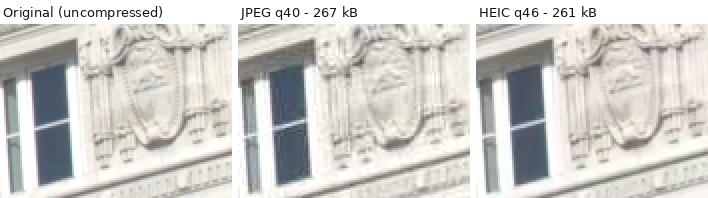
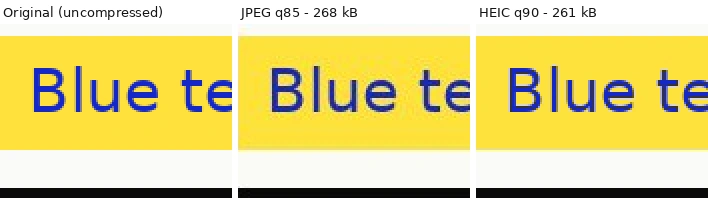
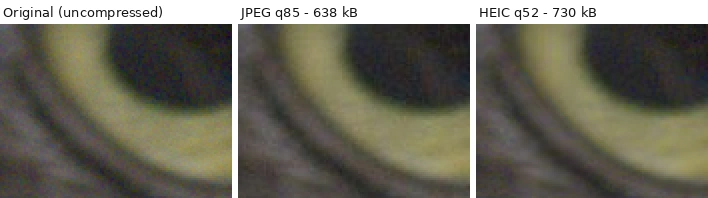
We cannot tell you which yardstick a particular viewer would side with, and neither metric replaces looking at the picture; the crops below are there so you can judge. We lean on the perceptual metric because it is the one built to track what people see, and because the SSIM result was almost flat across quality levels (0.52–0.55 at every anchor), which is a sign it is measuring something different from what makes JPEG artefacts visible.
Three more things move the answer. The encoder: ours is x265; Apple's differs. The quality you ask for: the saving shrinks from 42% at JPEG quality 60 to 12% at quality 92. The JPEG encoder: the same JPEG, losslessly re-packed with mozjpeg without changing a single pixel, was 4% smaller at quality 85 (2–6% across the range), which is roughly a fifth of the HEIC saving for free, in a format everything reads.
AVIF, which uses the same HEIF container with the royalty-free AV1 codec, finished within a few points of HEIC at every anchor (median 0.80 at quality 85; behind HEIC at quality 60, ahead at the other three). Lossy WebP, encoded with libwebp at its slowest setting, was no smaller than JPEG at the same score at quality 85 (median 1.05; smaller in 11 of 25 photos). If your goal is smaller files that open everywhere, HEIC to WebP is a convenience rather than a size win by this measure; HEIC to AVIF is the more compact choice. For all five formats side by side, including JPEG XL, see HEIC vs AVIF vs WebP vs JPEG XL.
What it looks like
Scores are a proxy. These are real crops from the test set, at the settings stated, with each source pixel enlarged to 2×2 so the artefacts are visible. All three panels are re-saved here as WebP at quality 95, which adds a little noise of its own to all of them equally.
Where HEIC does not win
- Some photos. HEIC was larger than the JPEG in 2 of 25 photos at the quality-85 anchor, and saved about 10% or less in 7 more (ratios of 0.90 to 0.98). We did not isolate why.
- High quality. At JPEG quality 92 the median saving falls to 12%, and 5 of 25 photos did not shrink at all (the final row of the table above).
- Encoding time. In our timing, HEIC took a median 3.6 s per image to encode against 39 ms for JPEG, roughly 90 times longer. Phones use dedicated hardware to hide this; software encoders do not.
- Decoding time. HEIC decoded in a median 284 ms against 31 ms for JPEG, in our software decoders, about nine times longer. It is rarely visible on one photo and adds up across a gallery on a slow device.
- Compatibility. The largest cost, covered below.
| Format | Encode | Decode | Software |
|---|---|---|---|
| JPEG | 39 ms | 31 ms | libjpeg-turbo (Pillow) |
| HEIC | 3.6 s | 284 ms | x265 encode, libde265 decode (pillow-heif) |
| AVIF | 1.2 s | 75 ms | libavif (pillow-avif-plugin), speed 6 |
| WebP | 1.4 s | 113 ms | libwebp, method 6 |
Four-core virtual machine, CPU only, no hardware acceleration. Treat these as relative, not as what a phone or browser does.
Colour depth, HDR and gain maps
Baseline JPEG stores 8 bits per colour channel, 256 levels. HEIC can store more: HEVC supports higher bit depths and the format lets an image carry extra layers. We tested the practical effect on a smooth 16-bit blue ramp that spans 12% of the tonal range across 2400 pixels, the kind of gradient a clear sky makes. Stored at 8 bits, the ramp collapsed to 32 distinct levels, visible as bands. Stored as 10-bit HEIC it kept 125 levels, and, with no banding steps to encode, the file was 75% smaller. The catch is that you need a 10-bit source and a 10-bit display path to see any of it.
What does an iPhone actually write? Apple's documentation we read gives no bit depth for HEIC photos, and the secondary sources we found disagree, so we are not going to state one. Open any photo in HEIC File Checker and it reports the bit depth read from that file.
HDR is handled differently in the two formats, and that matters more than bit depth for most photos. Apple's HDR photos store an ordinary image plus an 8-bit, single-channel gain map at a quarter of the resolution (opens in a new tab) that says how much to brighten each region. Android's Ultra HDR (opens in a new tab) does the same inside an ordinary JPEG, so older readers show the standard image and newer ones add the gain map. In both cases the HDR is optional extra data, which means a JPEG can now carry HDR too, and converting a HEIC to JPEG with a tool that ignores the gain map drops the HDR. Our HEIC HDR guide covers bit depth, PQ, gain maps and what our own converters do with each.
Compatibility
JPEG opens everywhere. HEIC opens natively on Apple platforms and in Safari 17+, and elsewhere only through an operating-system codec or an app that bundles one. Apple works around this itself: when you share by AirDrop, Messages or email, or import over USB, the system may convert to JPEG (opens in a new tab) automatically for devices that cannot read HEIC, and the Most Compatible camera setting writes JPEG from the start. Details by platform: HEIC browser support, opening HEIC on Windows, HEIC on Android.
Live Photos, metadata, transparency
- Live Photos. A Live Photo shows as one item in Photos but is composed of separate files (opens in a new tab): the still image and a movie. Converting the still to JPEG keeps the picture and loses the motion. See Live Photos and HEIC.
- Metadata. Both carry Exif. HEIC can also carry extra images such as the gain map above. Converters differ in what they keep, so check a converted file in HEIC File Checker if location or capture time matters.
- Transparency and animation. JPEG has neither. The HEIF container can hold alpha and image sequences, but photos from phones are almost always single, opaque pictures, so this rarely decides anything for ordinary photography. For a transparent graphic use PNG or WebP.
Editing and generation loss
Both formats are lossy, so each re-save discards more. We measured how fast it adds up on six photos by re-saving each repeatedly and scoring every generation against the untouched original. JPEG saved again at the same settings is gentle: the median score moved from 79.8 after the first save to 78.0 after the sixth. HEIC was not: from 81.3 to 72.6, a loss of 8.7 points against 1.8. Switching formats at every step (HEIC, then JPEG at quality 90, then HEIC and so on) fell from 81.3 to 69.2. We did not investigate the cause; a plausible one is that a JPEG re-saved on the same 8×8 grid with the same tables is nearly a fixed point, while a HEVC encoder makes fresh block decisions each pass.
Converting a HEIC to JPEG is the common case, and there files grow and quality still drops. A HEIC matched to a JPEG saved at quality 85 scored a median 81.2. Converted to JPEG at quality 85 it became a file 1.1× the size of the HEIC and scored 75.1. At quality 90: 1.4× and 77.5. At quality 95: 2.1× and 79.5. Even quality 100 did not return to the HEIC's score (80.8, at 4.3× the size). So converting costs both bytes and a little fidelity. For web and email, quality 85–90 is a sensible trade; keep the HEIC if the original matters.
Licensing and patents
HEIC pairs a standard container with HEVC, a patent-encumbered codec: licences are available from several pools such as Access Advance (opens in a new tab), and the combined fees are described as higher (opens in a new tab) than for its predecessor H.264. Can I use says (opens in a new tab) the licensing is complex and expensive and is why browsers other than Safari do not support it, and names AVIF and JPEG XL as free-licensed formats designed to supersede HEIC. Baseline JPEG, by contrast, was standardised with the aim (opens in a new tab) of being implementable without licence fees. This is background rather than legal advice; for a product, ask a lawyer.
Print, web and upload workflows
- Upload forms. Most accept JPEG and PNG and reject HEIC, sometimes with a generic error. Convert first with HEIC to JPG, which runs in your browser.
- Websites you publish. Browsers other than Safari will not display HEIC; serve WebP or AVIF (97% and 96% of users) with a JPEG fallback.
- Print shops. Many still ask for JPEG. Export at high quality (90+) and at the size they request; nothing is gained by exporting above the print resolution.
- Archiving. Keep the original HEIC (it holds the gain map and metadata) and convert copies on demand.
Which should you use?
| Situation | Use | Why |
|---|---|---|
| Sharing with people whose devices you do not know | JPEG | Opens everywhere, and Apple's sharing often converts for you anyway |
| Uploading to a form, marketplace or CMS | JPEG | HEIC is commonly rejected |
| Archiving your own camera originals | Keep HEIC | Smaller, and keeps gain map, depth and metadata |
| Saving space on a phone or in iCloud | HEIC | 12–42% smaller in our test, more if your encoder is better than ours |
| Publishing to the web | AVIF or WebP, JPEG fallback | Native support above 96%; HEIC is Safari-only |
| Heavy editing | Edit a copy; export once | Each re-save loses a little, format switches lose more |
| Printing | JPEG at quality 90 or higher | What print services accept |
| Text, screenshots, line art | PNG | Lossless and sharp; neither HEIC nor JPEG is built for it |
Try it here
Convert a HEIC to JPG here
Runs entirely in your browser; the file never leaves your device.
How we measured
Images. 24 camera raw files from raw.pixls.us (opens in a new tab), each released under Creative Commons Zero (CC0 1.0), from cameras including an iPhone 7 Plus, other phones, compacts, mirrorless and DSLRs, plus one page of text and graphics we drew ourselves. Each raw file was developed at full resolution with libraw (camera white balance, sRGB, 8-bit) and resized to 2400 px on the long edge with Lanczos resampling. Those 25 PNGs are the originals every codec is scored against. File IDs and SHA-256 checksums are in the script. The set has no portraits of people, because no CC0 raw sample we could use contained one; “skin tones” is represented by painted figurines only.
Encoders. JPEG: libjpeg-turbo 3.1.4 through Pillow 12.3.0 (optimised Huffman tables, 4:2:0), quality 20–97. HEIC: pillow-heif 1.8.0, libheif 1.23.4, x265 4.2, 8-bit 4:2:0, quality 10–70. WebP: libwebp 1.6.0, method 6, quality 20–95. AVIF: pillow-avif-plugin 1.6.0 with libavif and the aom 3.14.1 encoder, speed 6, 4:2:0, quality 10–90. A mozjpeg lossless repack was sized for each JPEG. Settings not named are library defaults.
Scoring. Every result was decoded and compared with its original using SSIM and PSNR from scikit-image 0.26.0 and SSIMULACRA2 from a third-party Python port (PyPI ssimulacra2 0.3.0, not the reference libjxl tool). Size at equal quality is interpolated per photo, linearly in log-bytes between the two measured points that bracket the target; photos where a format's sweep did not bracket the target are left out and counted (n is shown). SSIM and PSNR are classic and cheap; SSIMULACRA2 is closer to perception; none replaces looking.
Limits. x265 is not Apple's encoder. The originals are cleaner than a phone's processed output, and 2400 px is smaller than a modern phone photo. Twenty-five images is enough to show a spread, not to promise a ratio for your library. We did not test HEIC at higher chroma resolution, 10-bit input for photographs, or other encoders such as kvazaar. Software versions are those of one run on 2026-10-11; encoders improve.
Reproduce it. Run python scripts/benchmarks/heic-vs-jpg.py all in the site's repository; the header of the script lists the pip packages. It downloads the raw files, runs the sweeps and writes heic-vs-jpg.results.json and a CSV of every measured point (about 950 rows). The crops are made by the same script's crops stage.
| Image | Kind | JPEG q85 (kB) | Score | HEIC ÷ JPEG | AVIF ÷ JPEG | WebP ÷ JPEG |
|---|---|---|---|---|---|---|
| Text page (drawn by us) | text / graphics (synthetic) | 268 | 78.5 | 0.28 | 0.11 | 0.39 |
| 1178 Fujifilm X-T20 | architecture | 383 | 83.7 | 0.47 | 0.50 | 0.73 |
| 1068 Sony ILCA-68 | foliage | 389 | 83.1 | 0.56 | 0.56 | 0.82 |
| 1860 Sony NEX-5N | low light | 552 | 78.2 | 0.59 | 0.64 | 0.85 |
| 783 Sony ILCE-6300 | architecture | 469 | 79.1 | 0.62 | 0.59 | 0.87 |
| 2816 Sony DSC-RX100M5A | architecture | 651 | 81.2 | 0.67 | 0.64 | 0.83 |
| 1383 Yuneec CGO3 | landscape | 435 | 80.7 | 0.71 | 0.75 | 1.17 |
| 1135 Olympus TG-4 | landscape | 477 | 80.9 | 0.76 | 0.80 | 1.07 |
| 1792 Canon EOS 50D | low light | 740 | 80.3 | 0.77 | 0.75 | 0.97 |
| 2607 Panasonic DC-GH5S | skin tones (figurines) | 897 | 81.9 | 0.79 | 0.78 | 0.95 |
| 7270 OM System OM-1 Mark II | foliage | 1380 | 77.6 | 0.79 | 0.74 | 0.87 |
| 1373 Fujifilm FinePix S9500 | landscape | 474 | 82.1 | 0.81 | 0.81 | 1.10 |
| 1120 Panasonic DMC-FZ300 | architecture | 647 | 79.9 | 0.82 | 0.82 | 1.35 |
| 6813 Sony ZV-E1 | foliage | 708 | 78.3 | 0.83 | 0.78 | 1.05 |
| 9065 Nikon D2X | foliage | 851 | 81.5 | 0.84 | 0.80 | 0.97 |
| 792 Olympus SH-2 | landscape | 755 | 80.7 | 0.89 | 0.83 | 1.10 |
| 1681 Fujifilm X-Pro2 | graphics | 1029 | 79.7 | 0.90 | 0.83 | 0.99 |
| 920 Sony SLT-A37 | graphics | 648 | 80.7 | 0.93 | 0.91 | 1.17 |
| 5549 Fujifilm FinePix S6000fd | macro texture | 1373 | 67.5 | 0.93 | 0.91 | 1.06 |
| 2915 asus ASUS_Z01KD | architecture | 742 | 80.2 | 0.95 | 0.86 | 1.01 |
| 2645 Samsung SM-G950F | architecture | 465 | 81.8 | 0.96 | 0.94 | 1.32 |
| 939 Apple iPhone 7 Plus | landscape | 599 | 80.1 | 0.97 | 0.90 | 1.13 |
| 3920 Canon EOS Rebel T3 | low light | 339 | 78.3 | 0.98 | 1.01 | 1.53 |
| 1760 Pentax Q7 | low light | 638 | 77.8 | 1.08 | 1.03 | 1.27 |
| 1253 Panasonic DMC-FZ1000 | smooth studio | 819 | 76.6 | 1.33 | 1.17 | 1.32 |
Score is the SSIMULACRA2 score of that JPEG (the quality every other format had to match). Ratios below 1.00 mean the format needed fewer bytes. “Image” is the raw.pixls.us file number and camera.
Frequently asked questions
Try it yourself
Related reading
- HEIC vs AVIF vs WebP vs JPEG XL, measured
- What is HEIC? What's inside a HEIC file
- HEIC browser support: Chrome, Safari, Firefox, Edge
- Open HEIC on Windows 10 and 11: what works
- Why iPhone photos are HEIC, and how to change it
- Convert HEIC to JPG on Mac: every built-in way
- HEIC HDR: 10-bit, gain maps, Ultra HDR and colour
- Can a HEIC file contain a virus? What is verified
- Why a HEIC file won't open
Sources
- raw.pixls.us — raw sample repository — PIXLS.US, checked
- SSIMULACRA 2 — perceptual image quality metric — Cloudinary (GitHub), checked
- Using HEIF or HEVC media on Apple devices — Apple Support, checked
- HEIF/HEIC image format — browser support — Can I use, checked
- WebP image format — browser support — Can I use, checked
- AVIF image format — browser support — Can I use, checked
- Applying Apple HDR effect to your photos — Apple Developer Documentation, checked
- Ultra HDR Image Format v1.1 — Android Developers, checked
- Capturing and saving Live Photos — Apple Developer Documentation, checked
- High Efficiency Video Coding — Wikipedia, checked
- JPEG — Wikipedia, checked
- HEVC Advance patent pool — Access Advance, checked
- libheif — HEIF and AVIF decoder and encoder — strukturag (GitHub), checked
How we research and correct: editorial policy.
Written by the heic.fyi team · Last updated: · Spotted an error? Tell us.