Key takeaways
- HEIC is not a RAW format. It stores a photo that has already been processed and lossy-compressed. Apple ProRAW is a DNG file that keeps more of the data and the edit instructions, at about 25 MB (12 MP) or 75 MB (48 MP) according to Apple.
- What you gain is editing headroom. In our test, pushing shadows up 2 stops on an 8-bit file left 128 of the 224 tonal steps the raw data gave; a 10-bit file kept 221. Highlights the processed photo had clipped could not be brought back from either HEIC.
- It is not about compression. An 8-bit lossless PNG lost the same tonal steps as our 8-bit HEIC. Bit depth and the baked-in tone curve matter more than HEVC.
- ProRAW is Pro-only. Apple's Tech Specs list it on iPhone 12 Pro and later Pro models, up to the iPhone 18 Pro. 24 MP and 48 MP HEIF are on every model from iPhone 15 on, including the iPhone 17.
- 48 MP is for cropping and printing, not for sharing. Apple calls 24 MP the practical default; 48 MP HEIF (HEIF Max) is opt-in.
On this page
- Should I use HEIC or RAW on my iPhone?
- Is HEIC a RAW format?
- HEIC vs RAW: file size
- HEIC vs RAW quality: what survives an edit?
- HEIC 48 MP vs 24 MP: is the extra resolution worth it?
- Which iPhones have ProRAW, 48 MP and 24 MP?
- HEIC vs DNG: what is the difference?
- When is each the right choice?
- How we tested
Should I use HEIC or RAW on my iPhone?
Use HEIC. It is the default (Apple calls it High Efficiency), it is the smallest, and Apple's processing is already tuned to make it look good. Switch to ProRAW for single shots you plan to edit properly: a sunset with a black foreground, a backlit face, a window in a dark room. Use 48 MP only when you know you will crop hard or print large. If you are unsure, shoot HEIC; you can always shoot ProRAW next time, but you cannot add the data to a HEIC you already took.
Is HEIC a RAW format?
No. HEIC is a container (HEIF) holding a picture compressed with HEVC. By the time it is saved, the camera has chosen the white balance, the tone curve, the sharpening and the noise reduction, and the compression has discarded detail you are unlikely to miss. Apple's own engineers describe the processed HEIC or JPEG as the finished image: “you get a final image baked by Apple”, with a small file size “because it uses advanced lossy compression”. They call a raw file the opposite: the recipe rather than the cake.
What does “raw” mean?
A camera sensor records one colour per photosite behind a Bayer colour filter. A traditional raw file stores those values nearly as measured, in linear light, before any look is applied. Software then “demosaics” them into full-colour pixels. DNG, Adobe's open raw format, is a TIFF-based file that can hold that data with lossless compression; the Library of Congress (opens in a new tab) also notes it can hold linear raw data that has already been demosaiced.
Apple ProRAW is the second kind. Apple says it “combines the information of a standard RAW format along with iPhone image processing”. In Apple's WWDC 2021 session, the engineers say its pixels are scene-referred and linearisable, “may be generated from multiple demosaiced exposures combined with image fusion”, and stored as “losslessly compressed 12-bit RGB” using a companding curve, so that it can reach up to 14 stops of dynamic range. It is a standard DNG, so apps that read DNG can open it, though Apple warns it “might look different than expected” in an app that does not support ProRAW.
We looked inside a real one. The iPhone 12 Pro sample we tested (taken on iOS 14.3, in 2020) lists a 4032 × 3024 main image of 12 bits per sample, three samples per pixel, marked “Linear Raw”, stored as tiles with lossless JPEG compression, plus an 8-bit JPEG preview and a smaller 8-bit image. That is Exif data published with the sample, not something we decoded ourselves. It is not a Bayer mosaic.
HEIC vs RAW: file size
Apple's ProRAW article (opens in a new tab) says ProRAW files are “10 to 12 times larger than HEIF or JPEG files”, at about 25 MB for a 12 MP photo and 75 MB for a 48 MP one, and warns you may run out of space quickly or need a bigger iCloud plan. Our sample is a 29.2 MB DNG, in the same range. For comparison we rendered it and saved it other ways.
- 29.2 MB
- ProRAW DNG, 12.2 MP
- 2.14 MB
- our 8-bit HEIC of it
- 17.1 MB
- 8-bit lossless PNG
- 73.2 MB
- 16-bit RGB, uncompressed
iPhone 12 Pro sample, raw.pixls.us (CC0)
x265 quality 60, 1.41 bits per pixel
same rendered picture
computed: width × height × 6 bytes
HEIC vs RAW quality: what survives an edit?
At the size you view it, a HEIC and a raw file rendered to the same look are hard to tell apart. The difference appears when you change the picture afterwards. We tested the two most common edits on each file, applying the same change to the raw data and to the stored copies in linear light, then comparing each result with the raw edit.
Lifting shadows
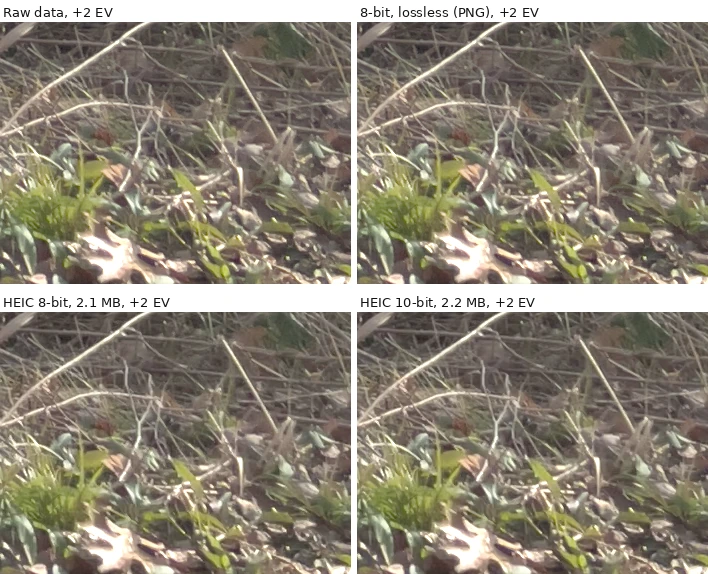
Two different things went wrong, and the numbers separate them. Compression softened fine detail in both HEIC files: SSIMULACRA2 scored them 80.4 (8-bit) and 81.5 (10-bit) against the raw edit, where the lossless 8-bit file scored 96.3. Bit depth shows up as tonal steps: in this crop the raw data gave 224 distinct levels after the push, the 8-bit lossless file only 128 and the 8-bit HEIC 127, while the 10-bit HEIC kept 221.
Pulling highlights back
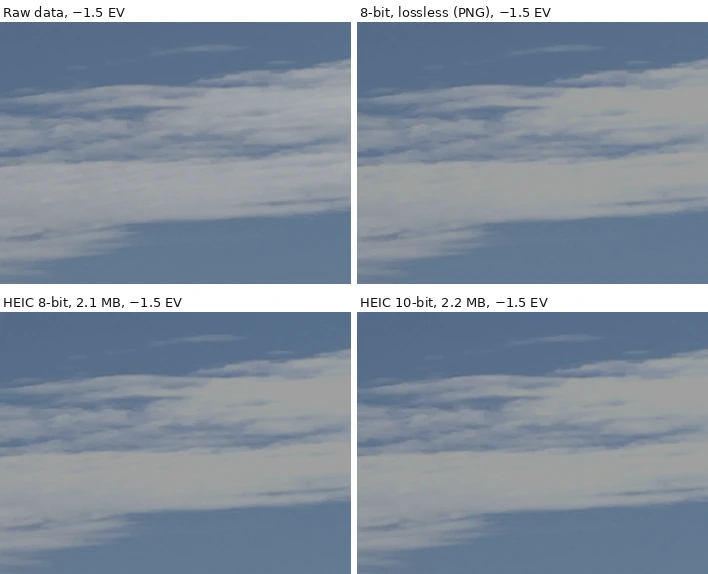
This is the strongest argument for raw, and it has nothing to do with HEVC. When we rendered a finished photo we let 0.5% of pixels clip to white, as a camera tone curve often does. In the iPhone sample the raw data was unclipped for 99.7% of those pixels, so the detail existed in the DNG and was gone from every stored copy. SSIMULACRA2 in that crop was 45.7 for the lossless file and 45.0 and 45.6 for the HEICs: all equally far from the raw edit. Where the render had not clipped, as in the Pixel 8 Pro highlight crop, the stored copies stayed close (91.6 lossless, 90.1 for 8-bit HEIC, 91.2 for 10-bit).
| Edit | Raw levels | 8-bit lossless | HEIC 8-bit | HEIC 10-bit |
|---|---|---|---|---|
| iPhone ProRAW, shadows +2 EV | 224 levels | 128 levels · score 96.3 | 127 · 80.4 | 221 · 81.5 |
| iPhone ProRAW, highlights −1.5 EV | 88 levels | 63 · 45.7 | 63 · 45.0 | 64 · 45.6 |
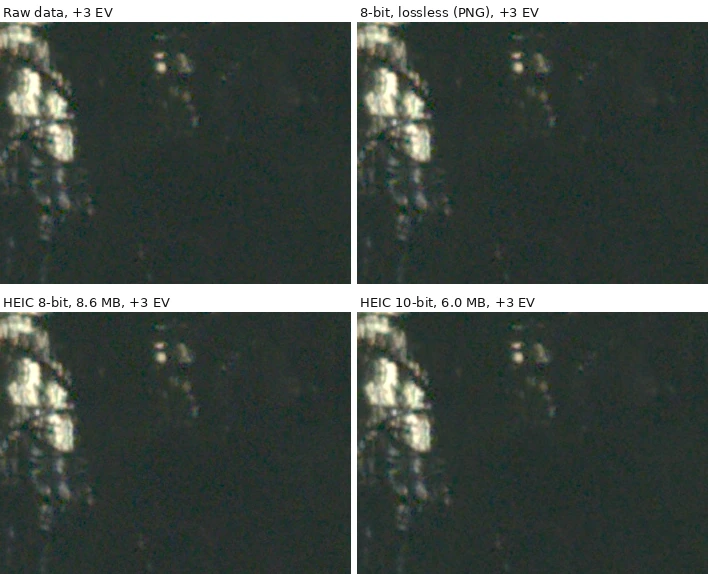
| Pixel 8 Pro DNG, shadows +3 EV | 230 levels | 96 · 93.9 | 97 · 81.3 | 228 · 87.5 |
| Pixel 8 Pro DNG, highlights −1.5 EV | 156 levels | 155 · 91.6 | 155 · 90.1 | 155 · 91.2 |
| File size: iPhone sample (12.2 MP) | 29.2 MB DNG | 17.1 MB | 2.14 MB | 2.15 MB |
| File size: Pixel sample (50.1 MP) | 45.1 MB DNG | 38.0 MB | 8.56 MB | 5.96 MB |
Levels are distinct green-channel values in the crop; scores are SSIMULACRA2 (opens in a new tab) of the crop against the raw edit (70 is “high quality”, 90 “visually lossless”). HEIC quality 60 (iPhone sample) and 72 (Pixel sample); the 10-bit file was smaller than the 8-bit at the same setting for the Pixel sample and we did not investigate why. Two images show a mechanism, not a rule.
What about the iPhone's own HEIC? We found no Apple page that states its bit depth, so we cannot say how it would score. The WWDC engineers note that ProRAW's “extra precision” makes it worth saving to “10-bit deep HEIC files” in your own code, which suggests the choice exists. To check a photo you already have, the HEIC Inspector reports the bit depth read from the file.
HEIC 48 MP vs 24 MP: is the extra resolution worth it?
From iPhone 15 on, Apple's Tech Specs list the Main camera with “super-high-resolution photos (24MP and 48MP)”. Apple introduced 24 MP as the default on the iPhone 15 Pro in September 2023, “offering incredible image quality at a practical file size ideal for storing and sharing”, and said 48 MP HEIF gives pro users “more flexibility to reframe their photos while retaining great resolution”. You can change the default under Settings > Camera > Formats > Photo Mode (12 MP or 24 MP), and turn on Resolution Control there to get 48 MP. Apple documents HEIF Max, which gives up to 48 MP, as a format you choose in the Camera app on iPhone 14 Pro and later Pro models with iOS 17.
| Pixels | HEIC file | Bits per pixel | Against 12 MP |
|---|---|---|---|
| 12 MP (4000 × 3000) | 322 kB | 0.215 | 1× |
| 24 MP (5657 × 4243) | 503 kB | 0.168 | 1.56× |
| 48 MP (8000 × 6000) | 842 kB | 0.140 | 2.6× |
Our measurement, not Apple's. One 50 MP Pixel 8 Pro photo cropped to 48 MP and Lanczos-resized to 24 and 12 MP, each saved as 8-bit x265 HEIC at quality 50. Downsizing smooths noise, which flatters the smaller files. Apple's ProRAW sizes are less forgiving: 25 MB at 12 MP, 75 MB at 48 MP, 3× for 4× the pixels.
Four times the pixels cost 2.6 times the bytes in our test, so a 48 MP HEIC is much heavier than a 24 MP one, but not four times heavier. Whether it is worth it depends on what you do with it. A 24 MP image already has roughly three times the pixels of a 4K screen. Choose 48 MP when you want to crop to a distant subject, or print large. Apple's tech specs also tell you where it is offered: the iPhone 17 Pro lists 24 and 48 MP photos on the Main camera and 48 MP on the Ultra Wide, and the iPhone 17 lists 24 and 48 MP on its Main and Ultra Wide.
Which iPhones have ProRAW, 48 MP and 24 MP?
- iPhone 17 Pro and Pro Max. ProRAW; “image formats captured: HEIF, JPEG, and DNG”; 24 and 48 MP photos on the Main camera and 48 MP photos on the Ultra Wide. The Telephoto is a 48 MP, 4× camera; the page does not say its photos are offered at 48 MP.
- iPhone 18 Pro and Pro Max. ProRAW; the same three formats; 24 and 48 MP photos on all three rear cameras.
- iPhone 17, Air, 17e. 24 and 48 MP photos on the Main camera (the iPhone 17's Ultra Wide too); image formats HEIF and JPEG only. No ProRAW, no DNG.
- Resolution is separate from format. Apple's guide lets you set the ProRAW default to 12 MP, 48 MP or “HEIF 48 MP” in Settings > Camera > Formats.
HEIC vs DNG: what is the difference?
| HEIC | DNG (including ProRAW) | |
|---|---|---|
| What it is | A HEIF container with HEVC-compressed pictures | Adobe's TIFF-based raw format; ProRAW is a DNG extension |
| Processing | Finished: look, sharpening and noise reduction baked in | Kept adjustable: ProRAW stores tone-map and masks as instructions |
| Compression | Lossy HEVC | Lossless (ProRAW uses 12-bit, losslessly compressed, by default) |
| Bit depth | 8-bit (heic) or 10-bit and more (heix) | 12-bit in ProRAW; cameras vary (raw.pixls.us lists 12, 14 and 16-bit files) |
| Size (12 MP iPhone) | About 2 MB in our test | About 25 MB, per Apple |
| Opens in | Apple apps, Safari, Windows with codecs | Photos, Capture One (Apple names it) and other apps that read DNG |
| Extension | .heic | .dng |
ProRAW is “an extension of DNG”: the Library of Congress describes DNG 1.6 as closely related to it, developed with Apple. Brands and the HEIC / HEIF distinction: HEIC vs HEIF.
Apple's sharing rules affect what you end up with. If you edit a ProRAW photo in Photos and share it, Apple says you share a JPG with your edits, not the DNG; emailing converts it to a smaller JPG; to keep both, import with Image Capture or AirDrop with All Photos Data on. Keep the original DNG. Converting a HEIC to JPEG for sharing is a different problem, covered in HEIC vs JPG, and the HEIC to JPG tool does it in your browser. Going the other way, from a HEIC you already have to a DNG, is covered in HEIC to RAW: it cannot be done, and we tested what a DNG wrapper adds.
When is each the right choice?
| Situation | Shoot | Why |
|---|---|---|
| Family photos, travel, everyday | HEIC (24 MP default) | Smallest; Apple's rendering is already good; opens in most apps |
| Low on phone or iCloud space | HEIC at 12 MP or 24 MP | ProRAW is 10 to 12 times larger, and 48 MP costs more again |
| Strong contrast: sunset, backlit, interiors | ProRAW | Highlights and shadows the HEIC render already discarded are still in the file |
| You will crop deep or print large | 48 MP HEIF, or 48 MP ProRAW | More pixels. ProRAW only if you also edit hard |
| White balance went wrong | ProRAW | Apple: raw gives more flexibility on exposure, colour and white balance |
| Will not edit, just share | HEIC | ProRAW photos you edit in Photos share as JPG anyway |
| Need Live Photos, Portrait mode or video | HEIC | Apple: ProRAW does not work with Live Photos, Portrait mode or video (2024 article) |
| Archiving for decades | Keep the original, HEIC or DNG | Do not convert a DNG to HEIC and delete it; that is lossy |
Try it here
Check a photo's bit depth and codec
Drop in a HEIC. It is read in your browser; nothing is uploaded.
How we tested
Files. Two raw files from raw.pixls.us (opens in a new tab), both listed as Creative Commons Zero (CC0 1.0) when we checked on 2026-10-11, with SHA-256 checksums in the script: file 4264, an Apple iPhone 12 Pro ProRAW DNG (iOS 14.3, 3024 × 4032, 29.2 MB), and file 7751, a Google Pixel 8 Pro DNG (8160 × 6144, 45.1 MB). Neither shows people.
Development. Each file was developed once with libraw 0.22.1 through rawpy 0.27.1: camera white balance, sRGB primaries, linear 16-bit output, no auto-brightness, highlights clipped at the white level. This linear image stands in for “the raw data” in everything below. It does not apply Apple's own tone map, so it is not the look an iPhone shows.
The stored copies. From the linear data we rendered one “processed photo” with a global recipe: an exposure gain chosen so that 0.5% of pixels clip, then the sRGB curve. We saved it as an 8-bit PNG (lossless), an 8-bit HEIC and a 10-bit HEIC, using pillow-heif 1.8.0, libheif 1.23.4 and x265 4.2 at 4:2:0 and the same encoder quality setting. For the iPhone sample the quality was the highest setting whose HEIC stayed within 1.5 bits per pixel, a figure implied by Apple's statement that ProRAW is 10 to 12 times larger than HEIF and about 25 MB at 12 MP.
The edits. Shadows up 2 stops (iPhone sample) or 3 stops (Pixel sample), and highlights down 1.5 stops, each applied in linear light to the raw data and to each stored copy, then the same tone curve and rounding to 8 bits. Each copy is scored against the raw edit on a fixed 700 × 525 crop: SSIMULACRA2 (third-party Python port ssimulacra2 0.3.0, not the reference tool) and the count of distinct green levels. The crops were chosen by a scan: the window with the most pixels clipped in the render but not in the raw data, and the darkest window with some texture. The panels show the centre 351 × 262 pixels at 100%.
Limits. The HEIC is x265, not Apple's encoder, and the render is a plain global curve, not Apple's pipeline, so none of the scores are iPhone scores. The iPhone sample is a 2020 ProRAW from a 12 MP phone; the Pixel sample is a Bayer file, which shows what ordinary raw gives when no frames were fused (0.34% of its pixels were saturated in the raw data itself, against 0.0016% in the iPhone file). We used sRGB; iPhone HEIC photos can use wider colour. Two images are enough to show a mechanism, not to promise a number for your photos.
Reproduce it. python scripts/benchmarks/heic-vs-raw.py all in the site's repository downloads the two files, verifies them, and writes heic-vs-raw.results.json and the images in public/images/learn/heic-vs-raw/. It takes about ten minutes. The brand-reading steps for the sample files are in HEIC vs HEIF.
Frequently asked questions
Try it yourself
Related reading
Sources
- About Apple ProRAW — Apple Support, checked
- Take Apple ProRAW photos with your iPhone camera — Apple Support (iPhone User Guide), checked
- WWDC 2021 session 10160: Capture and process ProRAW images — Apple Developer, checked
- Change advanced camera settings on iPhone — Apple Support, checked
- Apple unveils iPhone 15 Pro and iPhone 15 Pro Max — Apple Newsroom, checked
- iPhone 17 Pro — Tech Specs — Apple Support, checked
- iPhone 18 Pro — Tech Specs — Apple Support, checked
- iPhone Tech Specs (index of every model's specifications) — Apple Support, checked
- Using HEIF or HEVC media on Apple devices — Apple Support, checked
- Adobe Digital Negative (DNG), Version 1.6 — Format description — Library of Congress, checked
- raw.pixls.us — raw sample repository — PIXLS.US, checked
- SSIMULACRA 2 — perceptual image quality metric — Cloudinary (GitHub), checked
- libheif — HEIF and AVIF decoder and encoder — strukturag (GitHub), checked
How we research and correct: editorial policy.
Written by the heic.fyi team · Last updated: · Spotted an error? Tell us.