Key takeaways
- No converter can recover RAW from a HEIC. The HEIC holds rendered, lossy-compressed pixels at 8 or 10 bits. Our sister article measured that highlights the photo had already clipped cannot be brought back from any copy of it.
- A DNG wrapper adds nothing. We wrapped a decoded 8-bit HEIC in a 16-bit TIFF and a Linear DNG: both held the same 71 tonal levels as the HEIC, against 18,089 in the original data. The files were about 170 times larger than the 8-bit HEIC.
- “RAW” on these sites means different things. One page we opened writes a headerless pixel dump; another writes 8-bit pixels into a TIFF with DNG tags. Neither contains sensor data.
- For more headroom, keep more bits. A 10-bit HEIC kept 284 levels in our test against 71 for 8-bit; JPG and our PNG output give that up (8-bit), while our TIFF output kept all 1,024 levels of a 10-bit sample at 16 bits. To get real raw data, shoot RAW or ProRAW next time.
On this page
- Can you convert HEIC to RAW?
- What does a “HEIC to RAW” or “HEIC to DNG” converter actually do?
- Does wrapping a HEIC in a DNG or TIFF add anything?
- How do I convert HEIC to DNG?
- How do I get more editing headroom from a HEIC?
- Can I shoot RAW on an iPhone instead of HEIC?
- Is there any use for a HEIC in a RAW workflow?
- How we tested
Can you convert HEIC to RAW?
No. Converting means rewriting the same information in another format, and the information a RAW file holds is not in the HEIC. By the time the HEIC was saved, the camera had demosaiced the sensor's colour mosaic, chosen white balance, applied a tone curve and sharpening, and compressed the result with HEVC. Apple's engineers describe the HEIC or JPEG as the finished image “baked by Apple”, and raw as the material to make one. Our HEIC vs RAW article measured what that costs on real files: after the same exposure edit, an 8-bit copy of a processed photo kept 128 of the 224 tonal steps the raw data gave, and highlights the render had clipped were gone from every stored copy, lossless ones included.
What does a “HEIC to RAW” or “HEIC to DNG” converter actually do?
We opened two pages that rank for these searches and read what they say they do. We describe them without naming them, because the pattern matters more than the site. “RAW” turns out to be at least three different things:
| Output | What it is | Contains sensor data? |
|---|---|---|
| Camera RAW (.CR3, .NEF, .ARW, ProRAW .DNG) | Values from the sensor, kept linear and adjustable, written by the camera | Yes. Only the camera can make it |
| A headerless pixel dump | One page we opened says its output “contains pure binary pixel values arranged sequentially” with “no header or metadata”, and that to open it you must supply the width, height and bit depth. Options run from 8-bit grey to 32-bit RGBA | No. It is the decoded picture, with no way for a program to know its size |
| A DNG with the picture inside | Another page says it draws the HEIC onto a canvas and packs the pixels into a TIFF with DNG tags, as 8 bits per channel, and promises access to “raw exposure and color balance wheels”. It says transparent areas are blended against white and has no note that a HEIC is already processed | No. It is a rendered 8-bit picture in a raw-format wrapper |
Quotes are from the two converter pages as our fetch tool read them on 2026-10-12. Both say they work in your browser. We did not run either converter.
Both tools do what they say. The trouble is the word. A DNG file made this way can be opened by a program that reads DNG, but nothing about the pictures inside has changed.
Does wrapping a HEIC in a DNG or TIFF add anything?
We tested it. We made a smooth 16-bit gradient, like a dusk sky, with 18,089 distinct values in the green channel, saved it as an 8-bit HEIC and a 10-bit HEIC, decoded each, and wrote the decoded pixels into a 16-bit TIFF and a Linear DNG. Then we asked LibRaw, the raw decoder inside many raw programs, to open the DNG. It accepted it as a raw file and returned 16-bit RGB. Then we applied one strong contrast stretch to the original and to each wrapped copy and counted the tonal steps left.
| Copy | Levels as stored | After the stretch | File size |
|---|---|---|---|
| Original data, 16-bit | 18,089 | 256 (the 8-bit display ceiling) | not saved |
| 8-bit HEIC | 71 | 38 | 20.2 kB |
| That HEIC wrapped in a 16-bit TIFF | 71 | 38 | 3.46 MB |
| That HEIC wrapped in a Linear DNG | 71, values identical to the decoded HEIC | 38 | 3.46 MB |
| 10-bit HEIC | 284 | 145 | 10.2 kB |
| 10-bit HEIC wrapped in TIFF or DNG | 284 | 145 | 3.46 MB |
Synthetic 1,600 × 360 gradient, so the best case for showing banding; textured photos hide it better. HEIC from pillow-heif 1.8.0 (libheif 1.23.4, x265) at quality 90; the 10-bit file is smaller at the same setting, which we did not investigate. The DNG was opened by LibRaw 0.22.1 through rawpy 0.27.1 only; we did not open it in Lightroom, Photoshop, Apple Photos or Capture One.
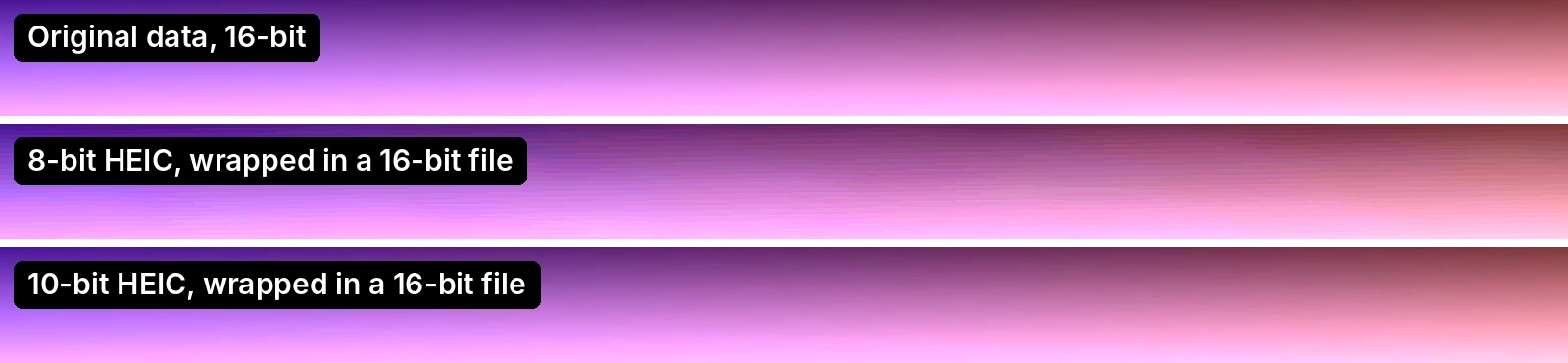
The container is a bucket; it cannot hold more water than was poured in. Putting 71 levels in a 16-bit file gives you 71 levels spread over a bigger scale, and the file is about 170 times larger than the HEIC. What did change is the bit depth of the HEIC itself: 10-bit kept four times the levels of 8-bit, which is the same pattern our HEIC vs RAW test found on real raw files.
How do I convert HEIC to DNG?
If a program or a form insists on a .dng, a wrapper like the one we built will get the pixels in, and LibRaw-based programs accepted ours. Expect nothing from the raw controls: the program will treat the picture as if it were already developed. We do not offer a DNG converter, because the result would look like a RAW file and give no raw benefit. What we do offer writes files that say what they are:
- [HEIC to PNG](/heic-to-png). Lossless, and keeps transparency. We tested it with our 10-bit 4:2:2 camera-style sample: the PNG came back as 8-bit RGBA, 1,600 × 1,200, within 2 levels of an independent decode. A 10-bit source is reduced to 8 bits, so this is not a headroom route.
- [HEIC to TIFF](/heic-to-tiff). A TIFF is the container editors expect for lossless work, and its default setting, Match the photo, writes 16-bit when the HEIC is 10-bit. We tested it with the same sample: a 16-bit RGB TIFF with LZW compression and an sRGB profile, 1.2 MB against 162.5 KB, holding all 1,024 tonal levels of the 10-bit source. This is the headroom route. Sony's own advice for its 10-bit HEIF stills is to convert to a 16-bit TIFF for editing, because TIFF keeps the 10-bit gradation, and to JPEG for playback.
- [HEIC to JPG](/heic-to-jpg). For sharing, not editing. 8-bit and lossy.
How do I get more editing headroom from a HEIC?
- Edit the HEIC directly in an app that opens it, or save a 16-bit TIFF with HEIC to TIFF if the source is 10-bit. Fewer conversions mean fewer rounding steps. See HEIC in Photoshop, Lightroom and GIMP for what each app does.
- Keep 10-bit if you have it. Camera HEIF is often 10-bit; many iPhone HEIC files are not documented either way (see HEIC HDR). In our test it was the difference between banding and none.
- Do not expect clipped highlights back. This is the main thing RAW gives you and a HEIC cannot, per the measurements in HEIC vs RAW.
- Do not convert to JPG first. JPG is 8-bit and lossy; every step down loses what the next edit would use.
Can I shoot RAW on an iPhone instead of HEIC?
On supported models, yes. Apple's iPhone guide says to go to Settings > Camera > Formats and turn on Apple ProRAW (or ProRAW & Resolution Control, depending on your model). Then in Camera tap JPEG or HEIC at the top of the screen, and tap RAW. Apple describes ProRAW as combining “the information of a standard RAW format along with iPhone image processing”, and says it is not supported in Portrait mode. A ProRAW file is a DNG, about 10 to 12 times larger than HEIF according to Apple. Which iPhones offer it, what sizes to expect and when it pays off are in HEIC vs RAW.
ProRAW is not raw in the strictest sense. Apple's own engineers say it is demosaiced and may combine several exposures, then stored as lossless 12-bit data that stays adjustable. It is still much closer to the sensor than any HEIC. On other phones and cameras, look for a RAW or DNG option in the camera's format settings; we did not check each model.
Is there any use for a HEIC in a RAW workflow?
Yes, as a finished picture. A HEIC is a fine thing to edit lightly, crop, resize or print. Treat the conversion tools as format changers and keep the original file. If you shoot RAW+HEIC on a camera, keep the RAW: deleting it to save space is the one step you cannot undo.
How we tested
Experiment. scripts/benchmarks/heic-to-raw-wrap.py builds the gradient, encodes it with pillow-heif 1.8.0 (8-bit, and 16-bit input stored as 10-bit), decodes it, writes a 16-bit TIFF and a Linear DNG with tifffile 2026.9.20 (PhotometricInterpretation LinearRaw, DNGVersion 1.4, identity colour matrix), and checks with rawpy 0.27.1 (LibRaw 0.22.1). It confirms the DNG values equal the decoded HEIC values. The contrast stretch maps 0.10 to 0.24 of full scale to black and white, then rounds to 8 bits.
Our converter. We ran our camera-style 10-bit 4:2:2 sample through HEIC to PNG in Chromium and compared the result with a Pillow decode: 8-bit RGBA, no embedded profile, maximum difference 2 levels. We also ran it through HEIC to TIFF on the default setting and read the file with tifffile 2026.9.20: uint16 RGB, LZW, 1,024 distinct green levels. Not done: we did not run the two third-party converters or open the DNG in a commercial raw program.
Frequently asked questions
Try it yourself
Related reading
Sources
- Take Apple ProRAW photos with your iPhone camera — Apple Support (iPhone User Guide), checked
- About Apple ProRAW — Apple Support, checked
- WWDC 2021 session 10160: Capture and process ProRAW images — Apple Developer, checked
- Adobe Digital Negative (DNG), Version 1.6 — Format description — Library of Congress, checked
- Characteristics of HEIF format — Sony, checked
- Example 'HEIC to RAW' converter page (third-party site, not named in the article) — Third-party converter site, checked
- Example 'HEIC to DNG' converter page (third-party site, not named in the article) — Third-party converter site, checked
How we research and correct: editorial policy.
Written by the heic.fyi team · Last updated: · Spotted an error? Tell us.