Key takeaways
- JPEG XL was smallest at every quality we tested above 60. To match JPEG’s SSIMULACRA2 score, its files were a median 61% of the JPEG’s bytes at score 70, 66% at 80 and 63% at 90. It won outright on 21 of 24 photos at score 80.
- HEIC and AVIF were level. Both needed about 69% of JPEG’s bytes at score 70, 78% at 80 and 86% at 90. HEIC was ahead at low quality (score 60: 57% against 61%).
- Lossy WebP saved nothing at high quality. 92% of JPEG’s bytes at score 70, 102% at 80, and at 8-bit 4:2:0 it could not reach score 90 on 14 of 25 photos.
- The winner depends on the metric. Judged by SSIM or PSNR, HEIC and AVIF were smallest and JPEG XL third. SSIMULACRA2, which we used, favours JPEG XL; no metric replaces looking, so the crops are below.
- Support reverses the order. Can I use: WebP 97.08% of users, AVIF 96.33%, HEIC 16.93% (Safari 17 and later), JPEG XL in Chrome 155 (6 October 2026) and partly in Safari 17.
On this page
- Which is better: HEIC, AVIF, WebP or JPEG XL?
- How much smaller is each format at the same quality?
- Does the winner change with the metric?
- Which is faster to encode and decode?
- Which browsers and apps open each format?
- What about licences and patents?
- What features does each format have?
- HEIC vs PNG: what about lossless?
- Which format should I use?
- What we did not test
- How we measured
Which is better: HEIC, AVIF, WebP or JPEG XL?
It depends on what you are optimising. For the smallest file at a given quality, JPEG XL, then HEIC and AVIF level, then WebP and JPEG. For reach, WebP and AVIF, which almost every browser opens; HEIC opens natively only in Safari 17 and later, and JPEG XL only in Safari 17 (partly) and Chrome 155. For photos you keep on an iPhone or Mac, HEIC is already what the camera writes. Nothing here is a reason to convert a photo library you are happy with: re-encoding between lossy formats costs quality (see HEIC vs JPG).
- 0.61
- JPEG XL, share of JPEG’s bytes at score 70
- 0.69
- HEIC and AVIF at score 70
- 0.92
- WebP at score 70
- 96–97%
- of users open WebP or AVIF
median of 25 photos
both; 0.78 at score 80
1.02 at score 80: no saving
HEIC 16.93%. Source: Can I use data of 11 October 2026
How much smaller is each format at the same quality?
For each of 25 photographs we encoded every format across a range of quality settings, scored each result, and read off how many bytes it takes to reach a given score. The images are the ones from our HEIC vs JPG test: 24 CC0 camera raws developed to 8-bit sRGB at 2400 pixels on the long edge (3.8 megapixels), plus one page of text and graphics we drew ourselves.
| Score | JPEG (typical file) | WebP | HEIC | AVIF | JPEG XL |
|---|---|---|---|---|---|
| 70 high | 382 kB | 0.92 (0.81–1.05) | 0.69 (0.54–0.79) | 0.69 (0.54–0.73) | 0.61 (0.56–0.69) |
| 80 | 622 kB | 1.02 (0.87–1.15) | 0.78 (0.65–0.90) | 0.78 (0.74–0.88) | 0.66 (0.58–0.70) |
| 90 visually lossless | 1,747 kB | 1.02 (0.98–1.04), 11 photos | 0.87 (0.82–0.94), 21 | 0.86 (0.84–0.88), 21 | 0.63 (0.58–0.71), 21 |
| Smaller than the JPEG in (score 70, 80, 90) | 16, 11, 4 photos | 24, 22, 20 | 24, 21, 21 | 25, 25, 21 | |
| Smallest of all five (score 70, 80, 90) | 0, 0, 0 | 8, 1, 0 | 5, 2, 0 | 12, 21, 11 |
0.78 means 78% of the JPEG’s bytes, 22% smaller. Each ratio is per photo, then the median: the size a format needs at that score divided by the JPEG’s. Photos are counted where both formats reached the score: 25 at 70, 24 to 25 at 80, and 21 at 90 (WebP reached it on 11, because lossy WebP is 8-bit 4:2:0 and tops out near 89.5). “Smallest of all five” counts the 25, 24 and 11 photos that every format reached. JPEG typical file is the median JPEG size at that score. At score 60, the HEIC median was 0.57, AVIF 0.61, JPEG XL 0.61 and WebP 0.86.
Three patterns hold across the table. JPEG XL’s lead grows with quality: it needed 92% of HEIC’s bytes at score 70, 81% at 80 and 73% at 90 (medians of the per-photo ratios). HEIC and AVIF are close but not the same: AVIF was about 2% smaller than HEIC at scores 70 to 90 and about 2% larger at 60, so neither dominated. At low quality HEIC wins: at score 60 HEIC was smallest on 13 of 24 photos, JPEG XL on 6 and AVIF on 5. The spread across photos is wide: at score 80 HEIC needed between 0.65 and 0.90 of the JPEG’s bytes for the middle half of photos.
Apple’s WebKit team (opens in a new tab) says a HEIC photo can take about half the space of an equivalent-quality JPEG. We did not see half: 22% smaller at score 80 with x265. Apple’s encoder differs from ours, and the claim does not say how quality was matched. Google’s WebP FAQ (opens in a new tab) says lossy WebP is typically 30% smaller than JPEG; at these scores we found it about the same size, with libwebp at its slowest setting. Different images, JPEG encoders and quality yardsticks give different answers, which is why we show the spread.
Does the winner change with the metric?
Yes, and it is the main caveat on the table above. SSIMULACRA2 comes from the JPEG XL ecosystem, and libjxl tunes its encoder with related perceptual measures, so it may flatter JPEG XL. We re-ran the comparison with two classic metrics we had already recorded for every encode. For each photo we took the SSIM (or PSNR) of the JPEG saved at quality 85 and read off what each format needs to match it.
| Metric | HEIC | AVIF | JPEG XL | WebP |
|---|---|---|---|---|
| SSIM | 0.54 | 0.54 | 0.61 | 0.69 |
| PSNR | 0.55 | 0.53 | 0.58 | 0.63 |
| SSIMULACRA2 (for comparison) | 0.82 | 0.80 | 0.67 | 1.05 |
Under SSIM and PSNR, HEIC and AVIF come out about 45% below JPEG, which is where the old “HEIC is half the size” figure comes from; JPEG XL falls to third. The last row is the same anchor, the quality-85 JPEG, scored with SSIMULACRA2; it matches what we measured in the HEIC vs JPG article for HEIC, AVIF and WebP. Neither classic metric models how people see artefacts, and SSIMULACRA2 is designed to, but it is not a human rating either. The SSIMULACRA2 figures are from the Python port; see How we measured for how it compared with the reference tool.
What do the files look like at the same score?
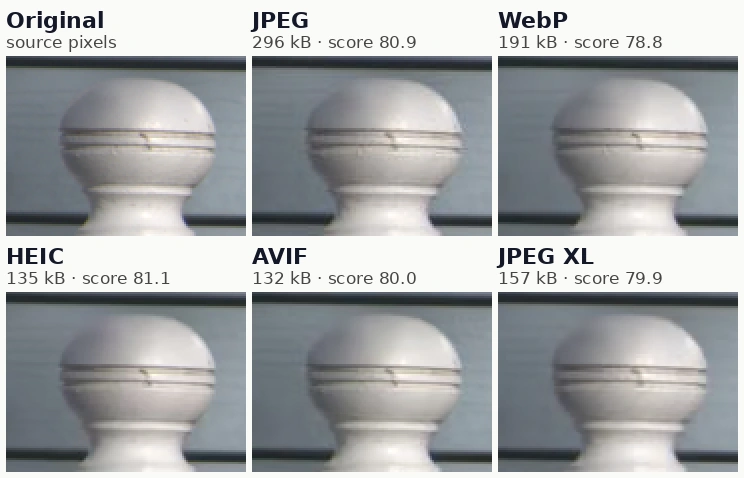
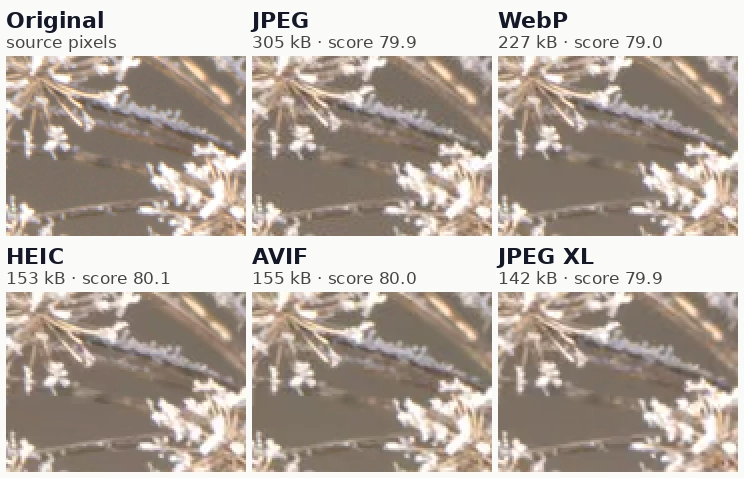
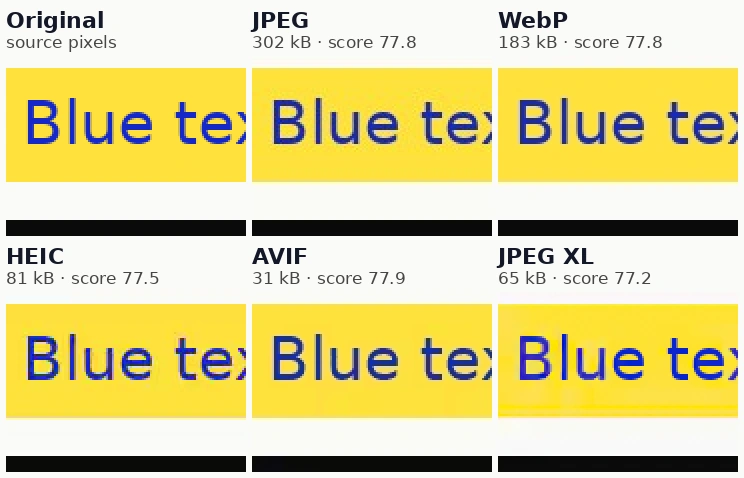
Scores are a proxy, so here are real crops, each enlarged 2× so artefacts show. For each photo we encoded every format at the setting that scores about 80 and cut out the same region. The file size under each label is for the whole 2400-pixel image. The scores printed on each tile come from the reference SSIMULACRA2 tool; they differ by a point or two because quality settings come in whole steps.
Which is faster to encode and decode?
Faster encoding and decoding go to the older, simpler codecs, and HEIC is the slowest of the five at both. We timed each format on every photo at the setting that scores 80, one at a time, taking the best of three runs. These are software encoders and decoders on a cloud CPU: phones encode HEIC in dedicated hardware, and browsers decode AVIF and WebP in optimised native code, so treat the ratios as the finding.
| Format | Encode, wall-clock | Encode, CPU time | Decode | Software |
|---|---|---|---|---|
| JPEG | 0.03 s | 0.03 s | 22 ms | libjpeg-turbo (Pillow) |
| AVIF | 0.85 s | 2.9 s | 42 ms | libaom speed 6 and libavif (pillow-avif-plugin) |
| WebP | 1.21 s | 1.2 s | 79 ms | libwebp method 6 |
| JPEG XL | 1.89 s | 1.8 s | 115 ms | libjxl 0.12.0 effort 7, one thread (imagecodecs) |
| HEIC | 2.41 s | 8.2 s | 219 ms | x265 4.2 (multi-threaded) and libde265 (pillow-heif) |
Wall-clock is what you wait; CPU time is the work done across all threads: x265 and libaom used several cores, libwebp and libjxl one. At this setting the files were about 624 kB (JPEG), 579 kB (HEIC), 522 kB (AVIF), 432 kB (JPEG XL) and 672 kB (WebP) in the median, but the sizes in the first table are per-photo ratios, which are the fair comparison. Slower, smaller settings exist for every encoder: libaom speed 6 and libjxl effort 7 are middle settings, not the best.
Two conclusions. JPEG XL pays for its size with encode time at effort 7: about two seconds a photo, twice AVIF’s wall-clock, but on one thread, so it parallelises across files well. HEIC is the expensive one: 8.2 CPU-seconds per 3.8-megapixel photo and a decode five times slower than AVIF’s. That is why phones use hardware, and why a batch of thousands is slower in HEIC than in any other format here. The numbers differ from the HEIC vs JPG timings (3.6 s encode there, at a different setting and with the machine busy), so compare within a table, not across articles.
Which browsers and apps open each format?
WebP and AVIF are safe for the web today; HEIC is not; JPEG XL is new. These are Can I use’s figures for 12 October 2026 (usage from StatCounter, September 2026). The JPEG XL share does not yet include Chrome 155, which reached stable on 6 October.
| Browser | HEIC | AVIF | WebP | JPEG XL |
|---|---|---|---|---|
| Chrome | no | 85 | 32 | 155; behind a flag from 145 |
| Edge | no | 121 | 18 | no (flag only in old versions) |
| Firefox | no | 93 | 65 | 158, not yet released (157.0.1 is current) |
| Safari, macOS | 17 | 16.4 | 16 (14 partial) | 17, partial |
| Safari, iOS | 17 | 16 | 14 | 17, partial |
| Global usage | 16.93% | 96.33% | 97.08% | 0.02% + 16.93% partial |
“Partial” for Safari means still images work but animated JPEG XL and progressive decoding do not, per Can I use. Chrome 155’s stable date is from the Chromium schedule; Firefox’s from Mozilla’s release list. Edge’s row is Can I use’s; we did not test Edge.
Chrome’s decision matters most. Google’s Chrome blog (opens in a new tab) (6 October 2026) says Chrome 155 ships JPEG XL decoding, using the Rust decoder jxl-rs, and recommends trying both AVIF and JPEG XL. Chrome had previously removed its earlier JPEG XL support in 2022, according to Wikipedia’s summary. Safari has decoded JPEG XL since 17.0; WebKit’s notes mention progressive loading and lossless recompression of JPEG files.
Operating systems and apps differ from browsers. Android’s supported-formats page lists HEIF decoding from Android 9 (device optional; 10-bit needs the optional HEVC Main10 profile) and encoding from 10, AVIF decoding from Android 12 and encoding from 14, WebP from 4.0, and no JPEG XL row. Windows needs the HEIF Image Extension for HEIC (see open HEIC on Windows); the Microsoft Store also lists a JPEG XL Image Extension. For code, see HEIC for developers. For browsers, HEIC browser support covers the HEIC detail.
What about licences and patents?
| Format | Codec | Software licence | Patent position |
|---|---|---|---|
| HEIC | HEVC (H.265) | libheif and libde265 LGPL; x265 GPL v2 or commercial; kvazaar (BSD) is an alternative encoder | Licences are sold through pools such as Access Advance and Via LA (links below). Software licences do not grant patent rights. |
| AVIF | AV1 | Open-source encoders such as libaom, SVT-AV1 and rav1e | The Alliance for Open Media patent licence grants a “perpetual, worldwide, non-exclusive, no-charge, royalty-free” licence under each licensor’s necessary claims. Separately, Sisvel runs an AV1 pool (21 patent owners, over 1,900 patents, July 2025) for finished products. |
| WebP | WebP lossy and lossless | libwebp, BSD 3-clause (Google) | Google’s patent grant: perpetual, irrevocable, royalty-free, ending for anyone who sues over the codec. |
| JPEG XL | ISO/IEC 18181 | libjxl, BSD 3-clause | Google’s patent grant for the implementation, royalty-free, ending on litigation; the JPEG Committee describes the reference software as royalty-free. |
None of this is legal advice. “Royalty-free” in a licence is a statement by those licensors; it cannot bind patent owners outside them, which is why a pool like Sisvel’s can exist beside the AOM licence. We did not research JPEG’s or PNG’s patent position. Check the terms that apply to your product, especially if you ship an encoder or decoder.
The pools’ own pages are Access Advance (opens in a new tab) and Via LA (opens in a new tab). The practical difference: a website that serves WebP or AVIF files to browsers is not shipping a codec. An app that ships an HEVC encoder or decoder is closer to what the pools address: Access Advance describes its licence as covering devices, software and commercial content distribution on physical media. The open-source HEIC stack reflects the split: LGPL decoders, a GPL encoder. See HEIC for developers for the library-by-library licence table.
What features does each format have?
- HEIC: HEVC in a HEIF container. libheif’s README lists alpha, depth maps, thumbnails, auxiliary images, several images per file, sequences and tiles, and 8 to 12-bit depth with the right decoder. Apple’s HDR photos use a gain map stored as an auxiliary image (see HEIC HDR).
- AVIF: AV1 in the same container family. The specification supports 8, 10 and 12 bits, alpha as an auxiliary image,
avisimage sequences, HDR signalling (mastering-display and content-light-level properties) and depth maps. AVIF’s Baseline profile (AV1 Main profile, level 5.1 or lower) limits picture size, so very large photos are stored as a grid of tiles. - WebP: lossy WebP is limited to 8-bit YCbCr 4:2:0, lossless is RGBA, the maximum is 16,383 × 16,383 pixels, and animation is supported. That is why it could not reach score 90 on most of our photos.
- JPEG XL: jpeg.org lists lossless JPEG recompression, HDR and high bit depth, alpha, animation, and lossless and progressive coding. Recompression is the feature none of the others has: an existing JPEG becomes a smaller JPEG XL file that converts back to the identical JPEG.
- JPEG: 8 bits per channel, no alpha. HDR happens through a gain map, as in Android’s Ultra HDR.
HEIC vs PNG: what about lossless?
PNG has no quality setting, because it is lossless, so “PNG vs HEIC quality” is really two questions. Lossy HEIC against PNG: a HEIC at score 80 is a small fraction of a PNG but not the same pixels. For a 2400-pixel photo, our PNG median was 6.6 MB against a 553 kB HEIC. Lossless HEIC against PNG: HEIC can be lossless too (x265 with 4:4:4 chroma and the identity matrix; we decoded every file and compared each pixel), but it was 7% larger than PNG.
| Format | Median vs PNG | Smaller than PNG in | Median encode time |
|---|---|---|---|
| PNG (Pillow, optimised) | 1.00 | n/a | 1.7 s |
| JPEG XL lossless, effort 7 | 0.88 | 25 of 25 | 7.0 s |
| WebP lossless, method 6 | 0.90 | 25 of 25 | 27.5 s |
| AVIF lossless, libavif, speed 6 | 1.00 | 12 of 25 | 6.0 s |
| HEIC lossless, x265 4:4:4 | 1.07 | 2 of 25 | 4.7 s |
All 25 round trips were bit-exact. Encode times were taken three jobs at a time on a shared machine, so read them as rough. The text-and-graphics page is the outlier: WebP lossless was 31% of its PNG, JPEG XL 98%, AVIF 157% and HEIC 453%. We did not test 16-bit images.
Use PNG for screenshots, text and line art you must open anywhere. If you want smaller lossless files, lossless WebP and JPEG XL beat PNG in our test, and lossless HEIC does not. PNG’s third edition (W3C Recommendation, 24 June 2025) also covers 16-bit samples, animation and HDR signalling, so it is not the limited format it once was.
Which format should I use?
| Situation | Use | Why |
|---|---|---|
| Photos you take on an iPhone or Mac | HEIC (keep it) | It is what the camera writes, and Apple says HEIF uses less space than JPEG at the same visual quality; we measured 22% at score 80 with x265 |
| Sending to people whose devices you do not know | JPEG | HEIC is Safari-only in browsers and Apple often converts it for you anyway; HEIC to JPG does it in your browser |
| A website with photos | AVIF or WebP, JPEG fallback | 96 to 97% of users; at equal quality AVIF was 22% smaller than JPEG, WebP no smaller. HEIC to AVIF, HEIC to WebP |
| A website that can serve three formats | JPEG XL, then AVIF, then JPEG | JPEG XL was smallest in our test and Chrome 155 and Safari 17 decode it; use <picture> so others fall back |
| Screenshots, text, line art | PNG | Lossless and universal; HEIC to PNG keeps transparency |
| A lossless archive you want smaller than PNG | JPEG XL or WebP lossless | 12% and 10% smaller than PNG in our test; check your software opens them |
| Shrinking an existing JPEG library with no loss | JPEG XL recompression | Reversible to the identical JPEG; only if everything you use can open JPEG XL |
What we did not test
- Other encoders and speeds. One encoder per format, at one speed: x265 (libheif default preset), libaom speed 6, libwebp method 6, libjxl effort 7, libjpeg-turbo. Slower settings, SVT-AV1, rav1e, kvazaar, mozjpeg and jpegli could change the ranking; Apple’s HEIC encoder is untested.
- Other images. 24 clean 8-bit sRGB raw developments at 3.8 megapixels and one synthetic page, not noisy phone JPEGs, HDR photos or 48-megapixel files.
- People. One metric family and no human ratings. We show crops so you can look.
- HDR, 10-bit, alpha and animation. The feature table is from documentation, not from our encodes, apart from lossless.
- Decoding on phones, power use and progressive loading. Our timings are software decoders on one cloud machine.
- Browsers. We read Can I use and vendor pages; we did not run the formats in Edge, Firefox or Safari ourselves.
How we measured
Images. The 25 images from the HEIC vs JPG benchmark, listed there: 24 camera raws released CC0 on raw.pixls.us (opens in a new tab) (cameras from an iPhone 7 Plus to mirrorless and DSLR), developed with libraw at full resolution (camera white balance, sRGB, 8-bit), resized to 2400 px on the long edge with Lanczos, and one text-and-graphics page we drew. The originals are PNGs and every codec was scored against them.
Encoders and settings. JPEG: libjpeg-turbo 3.1.4 via Pillow 12.3.0, optimised Huffman tables, 4:2:0, quality 20 to 100. HEIC: pillow-heif 1.8.0, libheif 1.23.4, x265 4.2, 8-bit 4:2:0, libheif’s default preset, quality 10 to 90. WebP: libwebp 1.6.0, method 6, quality 20 to 100. AVIF: pillow-avif-plugin 1.6.0 with libaom 3.14.1, speed 6, 4:2:0, quality 10 to 100. JPEG XL: libjxl 0.12.0 through imagecodecs 2026.10.10, effort 7, distances 0.25 to 12. Lossless AVIF used libavif 1.4.2 through imagecodecs at quality 100. All encoders ran single-threaded or at their defaults.
Scoring. Every result was decoded and compared with its original using SSIMULACRA2 from the PyPI ssimulacra2 0.3.0 Python port, plus SSIM and PSNR from scikit-image 0.26.0. Size at equal score is interpolated per photo, linearly in log-bytes between the two measured points that bracket the target; a photo where a format never reached the target is left out and counted. Port versus reference. We built the reference SSIMULACRA2 tool from libjxl 0.12.0 and compared it with the port on 42 encodes of three images. On the two photos (28 encodes) the port was a median 0.25 points from the reference (largest gap 1.9), and slightly generous: +0.2 points on average, +0.6 for JPEG XL, +0.4 for HEIC and about 0 for the rest, so it flatters JPEG XL a little. On our synthetic text page it read 2 to 7 points above the reference, so treat that one image’s scores as unreliable; it is 1 of 25. The scores printed on the crops above are from the reference tool. The comparison is in format-comparison.validate.json.
Timing. Per photo, each format encoded and decoded three times at the setting that scores 80, one process at a time, best run kept, on a shared four-vCPU cloud container (Intel Xeon 2.8 GHz). Other jobs shared the CPU, so use the ratios, not the seconds. Reproduce. python scripts/benchmarks/format-comparison.py all after python scripts/benchmarks/heic-vs-jpg.py fetch develop; it writes format-comparison.results.json and format-comparison.points.csv (about 1,400 measured points, plus the earlier benchmark’s points for the four formats it also covers).
Frequently asked questions
Try it yourself
Related reading
Sources
- SSIMULACRA 2 — perceptual image quality metric — Cloudinary (GitHub), checked
- raw.pixls.us — raw sample repository — PIXLS.US, checked
- HEIF/HEIC image format — browser support — Can I use, checked
- AVIF image format — browser support — Can I use, checked
- WebP image format — browser support — Can I use, checked
- JPEG XL (JXL) image format (Can I use) — Can I use, checked
- Shipping JPEG XL in Chrome — Chrome for Developers, checked
- Chromium milestone schedule, M155 — Chromium Dash, checked
- Firefox releases (whattrainisitnow) — Mozilla, checked
- WebKit Features in Safari 17.0 — WebKit, checked
- Supported media formats — Android Developers, checked
- AV1 Image File Format (AVIF) v1.2.0 — Alliance for Open Media, checked
- Alliance for Open Media Patent License 1.0 — Alliance for Open Media, checked
- Sisvel has licensed half the AV1 market — Sisvel, checked
- WebP FAQ — Google for Developers, checked
- libwebp PATENTS (Additional IP Rights Grant) — Google / WebM project, checked
- libwebp COPYING — Google / WebM project, checked
- libjxl README — libjxl, checked
- libjxl PATENTS (Additional IP Rights Grant) — Google / libjxl, checked
- JPEG XL (JPEG Committee) — JPEG, checked
- JPEG XL (Wikipedia) — Wikipedia, checked
- AVIF (Wikipedia) — Wikipedia, checked
- High Efficiency Image File Format — Wikipedia, checked
- HEVC Advance patent pool — Access Advance, checked
- HEVC/VVC patent portfolio license — Via LA, checked
- Introduction: legal notices (x265 documentation) — MulticoreWare, checked
- libheif — HEIF and AVIF decoder and encoder — strukturag (GitHub), checked
- Ultra HDR Image Format v1.1 — Android Developers, checked
- Using HEIF or HEVC media on Apple devices — Apple Support, checked
- Portable Network Graphics (PNG) Specification, Third Edition — W3C, checked
- HEIF Image Extension (Microsoft Store listing) — Microsoft Store, checked
How we research and correct: editorial policy.
Written by the heic.fyi team · Last updated: · Spotted an error? Tell us.