Key takeaways
- HEIC can be 8-bit or 10-bit. The brand inside the file says which:
heicis the 8-bit profile,heixallows 10 bits and more. Apple's documentation gives no bit depth for iPhone photos, so check your own file in the HEIC Inspector. - There are two kinds of HDR in a HEIC. A single 10-bit picture with a PQ or HLG curve, and an SDR picture plus a gain map. Apple's gain map is an 8-bit, one-channel auxiliary image. Google's Ultra HDR is the same idea inside a JPEG.
- Converting keeps the SDR look. JPEG and PNG are 8-bit standard-range formats. Our converters do not apply a gain map, and they do not tone-map a PQ or HLG picture. We show a warning for those.
- Display P3 is converted to sRGB by default. In our test the PNG matched an independent colour-managed conversion to within 0.02 levels on average; 12.3% of the pixels in our P3 chart fell outside sRGB and were clipped. A switch keeps the P3 profile.
- 10 bits is about smooth gradients. In our test the same gradient kept 124 distinct levels as 10-bit and 32 as 8-bit, so each step was a quarter the size.
On this page
- What is HDR in a HEIC file?
- Is HEIC 8-bit or 10-bit? What does an iPhone write?
- What does 10-bit actually buy you?
- What colour space does an iPhone photo use? Display P3, sRGB and BT.2020
- How is HDR signalled in a HEIF file? PQ, HLG, clli and mdcv
- What is Apple's HDR gain map in HEIC?
- What is Ultra HDR, and how is it different?
- Ultra HDR vs HDR: which is which?
- Which browsers and apps show HDR HEIC?
- What happens when you convert an HDR HEIC to JPG or PNG?
- Why do HDR photos look dull after conversion?
- How do I keep the HDR when converting? Options
- How can I check if my HEIC is HDR?
- How we checked
What is HDR in a HEIC file?
HDR, high dynamic range, means brightness above the level an ordinary (SDR) picture treats as white. A phone or camera can capture it, but a file has to store it somehow, and HEIC files do it in two ways. In the first, the pixel values themselves are HDR: a 10-bit picture whose numbers follow a curve built for brightness, PQ or HLG, with the colour space BT.2020. In the second, the file keeps a normal SDR picture and adds a gain map: a second, smaller image that tells an HDR-aware viewer how much to brighten each region. A viewer that does not know about the gain map shows the SDR picture, and the photo still looks right.
| Name | What it means | Source |
|---|---|---|
| HDR | Brightness above SDR white. Describes a display capability or a file's content, not one format. | General term |
| PQ, HLG | Two brightness curves for single-image HDR. In HEIF they are signalled as H.273 transfer codes 16 and 18. Apple's session calls this “ISO HDR”: 10-bit, storable in HEIF, AVIF, PNG and JPEG XL. | ITU-T H.273; Apple WWDC24 |
| Gain map | A second image that scales an SDR picture up to HDR. Apple calls its latest generation “Adaptive HDR”. | Apple WWDC24 |
| Ultra HDR | Google's name for a JPEG that carries a gain map. Not a HEIC format. | Android documentation |
| ISO 21496-1 | The standard for gain-map metadata, published in July 2025. | ISO |
| HDR10, Dolby Vision | Video and TV formats. They are not what a HEIC photo uses, and we did not research them for this page. | Not covered |
Is HEIC 8-bit or 10-bit? What does an iPhone write?
A HEIC photo is compressed with HEVC, and HEVC has profiles that set the bit depth. The brand written at the start of the file tells you which: heic for the Main and Main Still Picture profiles, which are 8-bit, and heix for higher profiles such as Main 10 and the range extensions, which allow 10 bits and more. Our HEIC vs HEIF page shows the bytes. The HEIC Inspector reports the bit depth directly.
What an iPhone writes is less clear than it should be. Apple's documentation gives no bit depth for the HEIC photos an iPhone takes. In 2017 Apple's engineers said iPhone photos use HEVC's Main Still Picture profile, which is 8-bit; we found no current Apple statement that confirms or changes that. Apple's documentation does say its gain map is 8-bit. Its 2024 HDR session recommends 10-bit HEIF with PQ for apps that save HDR images, which is advice for developers, not a description of what the camera writes. We had no iPhone file, so check yours: the Inspector's Codec details section shows “Bit depth”, and the HEIC File Checker says it in one sentence.
What does 10-bit actually buy you?
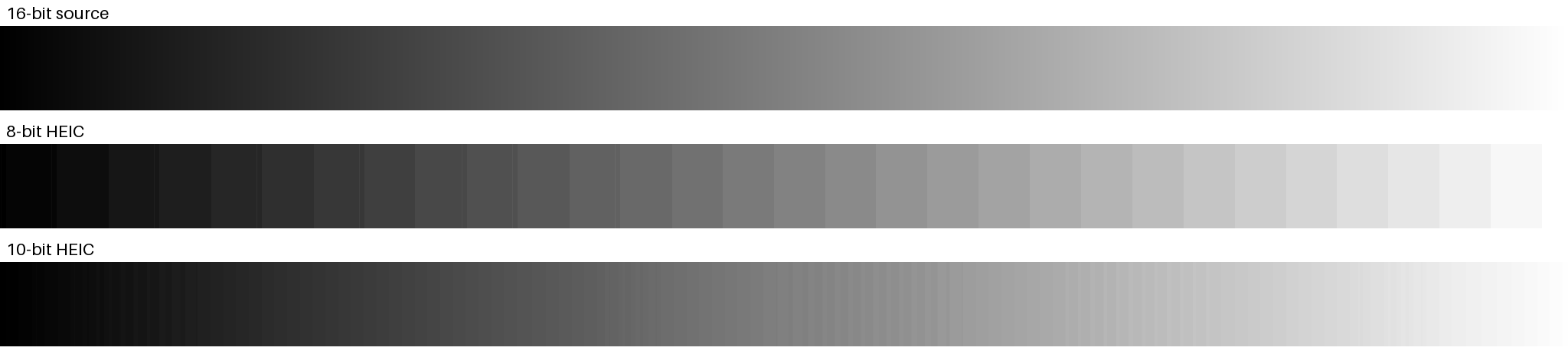
Smoother gradients. An 8-bit channel has 256 levels; a 10-bit one has 1,024. When a gradient is gentle, like a sky or a studio backdrop, there are only a few levels to span it, and the picture shows steps: banding. We made a smooth 16-bit gradient (12% of the brightness range across 2,048 pixels), stored it as a lossless 8-bit HEIC and as a lossless 10-bit HEIC with pillow-heif, and decoded both again at their native precision.
| Stored as | Compression | Distinct green levels | Typical step width | File size |
|---|---|---|---|---|
| 16-bit source | None | 2,048 (one per pixel column) | 1 px | n/a |
| 8-bit HEIC | Lossless | 32 | 60 px | 5,198 bytes |
| 10-bit HEIC | Lossless | 124 | 10 px | 5,608 bytes |
| 8-bit HEIC | Quality 90 | 32 | 60 px | 4,593 bytes |
| 10-bit HEIC | Quality 90 | 125 | 10 px | 1,577 bytes |
Counted on the green channel after taking the median of each pixel column. 10-bit output is 124 or 125 levels rather than exactly four times 32 because the gradient does not start on a level boundary. The 10-bit file being smaller at quality 90 is a quirk of a synthetic gradient; do not read it as a rule for photos.
Why HDR needs more bits than SDR is a matter of arithmetic. The PQ curve spans 0 to 10,000 cd/m², so one code value covers a bigger relative brightness jump than in SDR. Using the formulas in ITU-T H.273, here is how big the jump between neighbouring code values is:
| Encoding | At 1 cd/m² | At 10 | At 100 | At 1,000 |
|---|---|---|---|---|
| sRGB, 8-bit (white = 100 cd/m²) | 6.3% | 2.4% | 0.9% | above range |
| PQ, 8-bit | 8.0% | 5.1% | 4.0% | 3.7% |
| PQ, 10-bit | 1.9% | 1.3% | 1.0% | 0.9% |
| PQ, 12-bit | 0.5% | 0.3% | 0.2% | 0.2% |
From the PQ formula in ITU-T H.273 Table 3 and the standard sRGB curve. 10-bit PQ gives steps of about 1% at 100 cd/m², close to 8-bit sRGB in its own range; 8-bit PQ would give steps about four times as large. We do not claim a visibility threshold, since that depends on the viewer and the scene.
What colour space does an iPhone photo use? Display P3, sRGB and BT.2020
A colour space says which colours the numbers in a file mean. sRGB is the web's default. Display P3 is wider, with more saturated reds and greens, and it is what Apple's displays are built around; BT.2020 is wider still and is the space used for HDR video and single-image HDR. Their corners, the primaries, are fixed by ITU-T H.273 and shown below. Display P3 shares sRGB's brightness curve and white point, which is why Apple's engineers call it a larger gamut, not a different kind of picture.
What does an iPhone use? Apple's 2016 newsroom text says iPhone 7 has “wide color capture”, and its WWDC16 photography session calls that space Display P3, says it shares sRGB's gamma and white point, and says wide-colour JPEGs carry a Display P3 profile. The same session warns that a viewer that is not colour-aware will render P3 as sRGB and “the colors will all look wrong”. Whether a given HEIC is tagged P3 is a property of the file. It is declared either as an embedded ICC profile or as an nclx colour description with code 12 for the primaries. The Inspector's capability checklist marks which one a file has.
How is HDR signalled in a HEIF file? PQ, HLG, clli and mdcv
Single-image HDR is labelled with a colr box of type nclx, three numbers from ITU-T H.273: colour primaries, transfer characteristics and matrix coefficients. 9 means BT.2020 primaries, 16 means PQ (SMPTE ST 2084), 18 means HLG (ARIB STD-B67). Two optional boxes add the light levels: clli for the content (MaxCLL and MaxFALL) and mdcv for the display it was graded on. libheif says their semantics follow the H.265 SEI messages for content light level and mastering display colour volume.
We made a sample that does exactly this: hdr-pq-10bit-bt2020.heic. Read from its bytes and from the Inspector:
| Property | Value in the file | Meaning |
|---|---|---|
| Brand and profile | heix, HEVC Range Extensions, 10-bit 4:2:0 | More than 8 bits |
colr nclx | primaries 9, transfer 16, matrix 9, full range | BT.2020 colours, PQ curve |
clli | max content 1000 cd/m², max frame-average 136 cd/m² | Brightest patch 1000 nits |
mdcv | peak 1000 cd/m², black 0.005 cd/m² | Mastered on a 1000-nit display |
| Gain map | Not present | This is single-image HDR |
From the Inspector's item properties on 12 October 2026. The sample is a rendered test chart, not a photograph.
What is Apple's HDR gain map in HEIC?
Apple's developer documentation describes it. The photo's normal picture is the SDR base. The gain map is an auxiliary image of type urn:com:apple:photo:2020:aux:hdrgainmap: “an 8-bit, single-channel luminance map”, untagged linear data encoded with the Rec. 709 transfer function and a quarter of the original's resolution. To make the HDR rendition you resize the gain map, linearise it and the SDR image, work out a headroom from metadata in the file's maker note, and multiply: hdr = sdr * (1 + (headroom - 1) * gainmap). In Apple's 2024 session, the headroom for an iPhone HDR photo is above 1 and up to 8, and Apple describes the file as holding “a set of ingredients” and “a recipe” rather than an HDR image.
Apple said in 2024 that iPhone cameras have captured gain maps since 2020, and that iOS 18 moves to a newer generation, “Adaptive HDR”, based on a draft of what became ISO 21496-1. A HEIC captured on iOS 18 still contains one image to the programming interface, with the HDR look available as an alternate (a tmap tone-mapped image). Apple's page notes that its technique was proposed for ISO as 21496-1 and that Apple is prepared to commit to license essential patents on it.
To see whether a file has one, open it in the HEIC Inspector. Its capability checklist has an “HDR gain map” row, and its auxiliary images table lists the item with its type URN. We have no iPhone HDR photo in our files, so we tested that detection on a copy of one of our samples whose auxiliary image we relabelled with Apple's URN. The Inspector listed it as “HDR gain map” with that URN. That shows the detection works; it does not show every real iPhone file will parse. The Inspector's code also recognises tmap items, which we have not tested on a real file.
What is Ultra HDR, and how is it different?
Ultra HDR is Google's gain-map format for JPEG, described in the Android documentation (version 1.1, last updated 24 October 2024). The primary image is an ordinary SDR JPEG; the gain map is a second JPEG appended with Multi-Picture Format and GContainer metadata, with its parameters in XMP under the namespace http://ns.adobe.com/hdr-gain-map/1.0/ (hdrgm:Version="1.0", GainMapMax, Gamma, offsets and HDRCapacityMin and Max). The gain map must be 8-bit. Legacy readers show the SDR JPEG. Android supports displaying Ultra HDR from Android 14, and from Android 15 it writes and reads ISO 21496-1 metadata alongside the original.
| Apple (HEIC) | Ultra HDR (JPEG) | |
|---|---|---|
| Container | HEIF; gain map is an auxiliary image item | JPEG; gain map is a second JPEG (MPF) |
| Base image | SDR picture | SDR JPEG, colour profile defines the colour space |
| Gain map | 8-bit, one channel, 1/4 of the pixels | 8-bit |
| Parameters | Maker note values and, from iOS 18, ISO 21496-1 style metadata | XMP hdrgm fields; ISO 21496-1 metadata from Android 15 |
| If a viewer ignores the gain map | Shows the SDR picture | Shows the SDR JPEG |
From Apple's developer documentation and 2024 WWDC session, and Android's Ultra HDR format page. The same idea in two containers, with different metadata.
Ultra HDR vs HDR: which is which?
They are not rivals. “HDR” says a picture contains brightness beyond SDR white. Ultra HDR is one way of storing it, in a JPEG with a gain map. Apple's gain-map HEIC is another, and a 10-bit PQ file is a third. ISO 21496-1 tries to make the gain-map approach common to all: ISO lists edition 1, 16 pages, published July 2025, defining “a gain map used in HDR digital photography applications” and its metadata. How widely software implements it we did not measure; Android 15 and, per Apple's session, iOS 18 moved to it.
Which browsers and apps show HDR HEIC?
| Where | What is documented | Source |
|---|---|---|
| Browsers and HEIC itself | Only Safari 17 and later display HEIC natively; Chrome, Edge and Firefox do not. That also applies to HDR HEIC. | Can I use |
| Safari 26 (iOS, iPadOS, macOS, visionOS 26) | “Added support for HDR Images”; the CSS dynamic-range-limit: standard converts HDR content to SDR. WebKit does not name image formats in that post. | Safari release notes; WebKit blog |
| iOS 18 and macOS 15 | Messages, Quick Look and Preview render HDR with the full display headroom; in iOS 17 and macOS 14 only Photos did. | Apple WWDC24 |
| Android 14 and later | Ultra HDR displays when the app switches its window to HDR colour mode; older Android shows the SDR image. | Android documentation |
| Chrome, Edge, Firefox on Ultra HDR JPEG | We did not find a primary source from the browser makers, so we make no claim. | Unverified |
Apple's session says that by default an image decodes to its SDR look, and an app has to ask for the HDR rendition. A viewer showing a gain-map photo as SDR is therefore normal behaviour, not a fault.
What happens when you convert an HDR HEIC to JPG or PNG?
JPEG and PNG, as our tools write them, are 8-bit standard-range pictures. Decoding takes the HEIC's primary image to 8-bit RGBA in a Web Worker, applies colour management, and hands the pixels to the browser's JPEG or PNG encoder. What that does to each kind of file, read from src/lib/engine/color/resolve.ts, heif.ts and inspect and then measured on the samples:
| Input | What the code does | What we measured |
|---|---|---|
| 8-bit sRGB | Decodes; no conversion. JPG carries an sRGB profile. | Converted normally. |
| Display P3 (ICC profile or nclx code 12) | Converts to sRGB by default. “Keep wide colour” embeds the P3 profile instead (JPG and PNG). | PNG matched an independent ICC-managed conversion to a mean difference of 0.02 levels (99% of pixels within 1). 12.3% of the chart's pixels were outside sRGB and clipped. With the switch on, the PNG held the original P3 codes (mean 0.02 apart) and a Display P3 profile. |
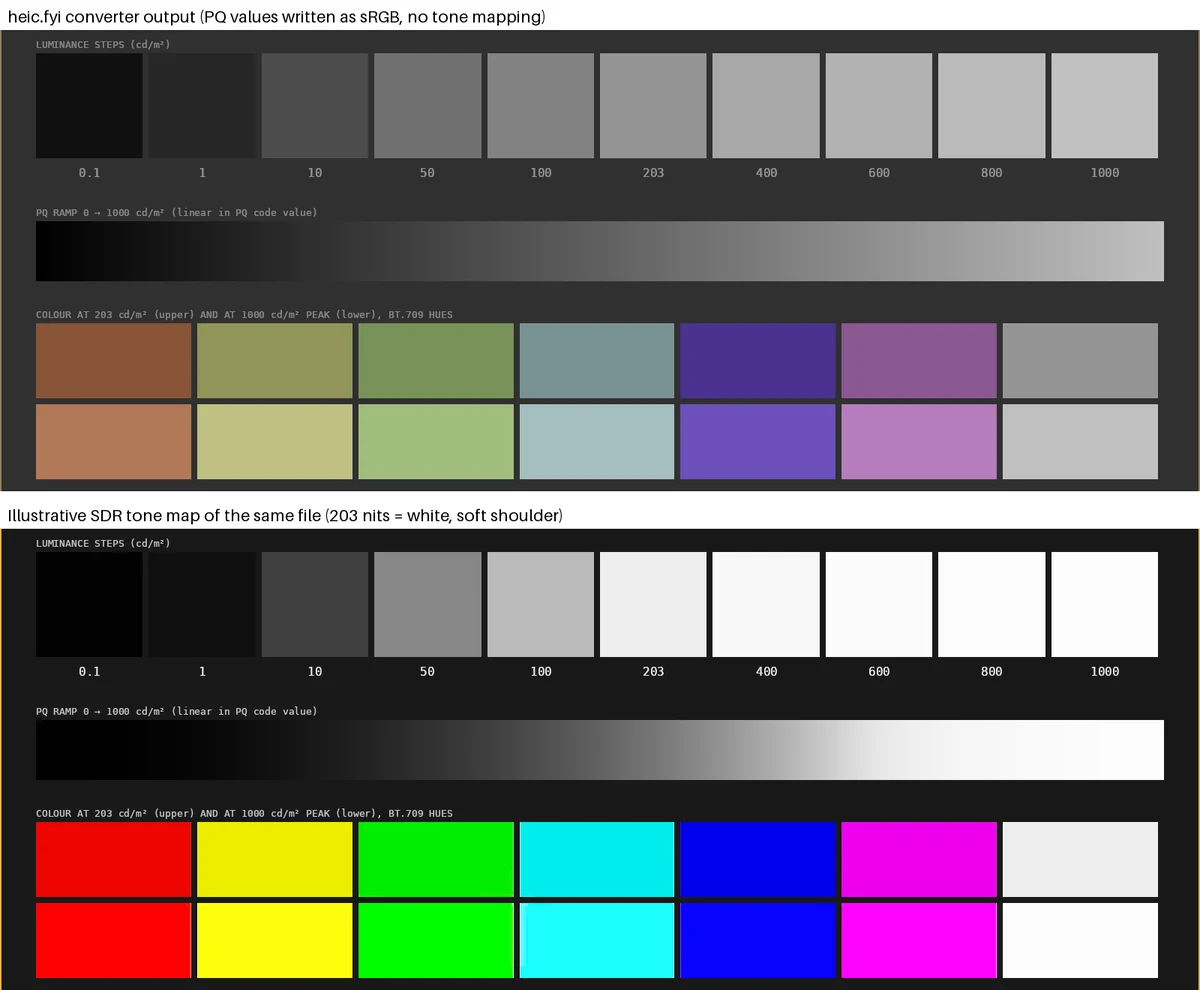
| PQ or HLG, BT.2020 | No conversion: the code treats PQ and HLG as curves that “need tone mapping” and skips them. The page warns: “This photo uses a colour encoding that could not be converted (for example an HDR curve), so its colours may look different from the original.” | The PNG's values were the PQ signal itself (mean 0.2 levels from signal × 255). The JPG was tagged sRGB. See the comparison below. |
| Gain-map HDR (Apple HEIC) | Decodes the primary (SDR) image. The gain map is a separate auxiliary item and is not read. | Not tested on a real iPhone file. The Inspector's own text says the tool does not apply gain maps. |
| 10-bit | Reduced to 8 bits when decoded to RGBA. | Output PNG is 8-bit. |
Measured on the CC0 samples hdr-pq-10bit-bt2020.heic and display-p3-10bit.heic with the converters running in headless Chromium, outputs compared with Pillow. No upload occurred: every request was a plain GET.
Why do HDR photos look dull after conversion?
- The brightness was in the gain map or in the curve. For a gain-map photo, the HDR highlights come from multiplying by the gain map. A JPG converted from the SDR base cannot have them. For PQ, the same numbers on an sRGB display are read with the wrong curve, which flattens contrast and mutes colour, as in the comparison above.
- An SDR picture cannot go above white. On an HDR screen, an SDR JPG can be at most as bright as SDR white. The bright regions of the original HDR are compressed into that.
- Wide colour can lose its profile. Display P3 pixels shown as sRGB look duller. In our test, reading the P3 chart's codes as sRGB, without converting, differed from the correct conversion by a mean of 5.3 levels on a 0 to 255 scale. Our converters convert by default and the P3 option tags the profile.
- A viewer may not apply the gain map. Apple's session says apps must request it. A photo can look flat in an app that does not, even though the file is fine.
How do I keep the HDR when converting? Options
- Keep the HEIC for devices that show it, and make a JPG only for sharing. Conversion is one-way for the gain map.
- Keep wide colour. In HEIC to JPG or HEIC to PNG, tick “Keep wide colour” to embed the P3 profile. That preserves colour range, not HDR brightness.
- Do not expect HDR from our AVIF or WebP outputs. Our AVIF encoder is set to 8-bit, and WebP has no profile embedding here. Both are standard-range as we make them.
- Use software that understands the format if you need HDR out of the file: an editor that reads Apple's gain map or PQ, or a tool that writes Ultra HDR. We do not write Ultra HDR, and we have not tested other tools for this page.
- For a PQ file, convert with tone mapping in an editor that applies one. Our warning tells you when a file needs that.
How can I check if my HEIC is HDR?
- 01
Open the file in the HEIC Inspector
HEIC Inspector reads it in your browser and uploads nothing.
- 02
Read Codec details
“Bit depth” says 8-bit or 10-bit, and Profile says Main or Range Extensions. The brand at the top reads
heicorheix. - 03
Read the capability checklist
Look at “nclx colour description”, “Embedded ICC profile”, “HDR gain map” and “HDR light-level metadata (clli / mdcv)”. The last one is a sign of single-image HDR; the gain-map row is the iPhone kind.
- 04
Open the item's properties
In the item table, expand the properties. A line such as “nclx: primaries 9 (BT.2020 / BT.2100), transfer 16 (PQ)” is HDR. “prof: embedded ICC profile” means the colour space is in a profile; the HEIC File Checker shows its name, such as “Display P3”.
- 05
Compare with a sample
Download the CC0 files from HEIC sample files: an 8-bit sRGB file, a 10-bit Display P3 file and the PQ file.
| File | Bit depth | Colour | HDR signal |
|---|---|---|---|
| basic-8bit-srgb.heic | 8-bit, brand heic | nclx 1 / 13 / 6 (sRGB) | None |
| display-p3-10bit.heic | 10-bit, brand heix | Embedded ICC profile, “Display P3” | None |
| hdr-pq-10bit-bt2020.heic | 10-bit, brand heix | nclx 9 / 16 / 9 | PQ, with clli and mdcv |
Try it here
Check whether your file is healthy first
Drop in a HEIC. It is read in your browser and never uploaded.
How we checked
Banding. scripts/benchmarks/heic-hdr.py banding builds a 2,048 × 320 gradient from (0.30, 0.48, 0.76) to (0.42, 0.60, 0.86) in 16 bits, stores it as an 8-bit and a 10-bit HEIC with pillow-heif 1.8.0 (libheif 1.23.4, x265 4.2), at lossless and at quality 90, decodes at native precision and counts levels and step widths. Step sizes use the PQ formula in ITU-T H.273 Table 3. Gamut uses the primaries in H.273 Table 2 and the CIE 1931 2-degree observer from colour-science 0.4.7 for the outline.
Converters. heic-hdr-convert.mjs drives the site's own converter pages in headless Chromium on the PQ and Display P3 samples; heic-hdr.py converted compares the outputs with a Pillow ICC conversion and with the decoded PQ signal. The PQ comparison image uses a simple tone map we wrote. Standards and vendors were read on 12 October 2026: ITU-T H.273 (07/2024), ISO's page for 21496-1, Apple's developer documentation and WWDC sessions, Android's Ultra HDR pages, Safari 26's release notes.
Frequently asked questions
Try it yourself
Related reading
Sources
- ITU-T H.273 (V4, 07/2024): Coding-independent code points for video signal type identification — ITU-T, checked
- ISO 21496-1:2025: Digital photography — Gain map metadata for image conversion — Part 1: Dynamic range conversion — ISO/TC 42, checked
- ITU-R BT.2100: Image parameter values for high dynamic range television — ITU-R, checked
- Applying Apple HDR effect to your photos — Apple Developer Documentation, checked
- WWDC 2024 session 10177: Use HDR for dynamic image experiences in your app — Apple Developer, checked
- WWDC 2017 session 513: High Efficiency Image File Format — Apple Developer, checked
- WWDC 2016 session 501: Advances in iOS Photography — Apple Developer, checked
- Apple introduces iPhone 7 and iPhone 7 Plus — Apple Newsroom, checked
- Ultra HDR Image Format v1.1 — Android Developers, checked
- Display Ultra HDR images — Android Developers, checked
- libheif: heif_color.h (colour profiles and HDR metadata) — libheif maintainers (GitHub), checked
- News from WWDC25: Web technology coming this fall in Safari 26 beta — WebKit, checked
- Safari 26 Release Notes — Apple Developer, checked
- dynamic-range-limit — MDN Web Docs, checked
- HEIF/HEIC image format — browser support — Can I use, checked
- EOS R5 Advanced User Guide: HDR PQ Settings — Canon, checked
- Z6III Reference Guide: Tone Mode — Nikon, checked
- Colour (colour-science) — Colour Developers, checked
- ISO/IEC 23008-12:2025 — Image file format (HEIF), edition 3 — ISO/IEC, checked
How we research and correct: editorial policy.
Written by the heic.fyi team · Last updated: · Spotted an error? Tell us.