Key takeaways
- It is a HEIC with several full-size images. Apple's Mojave file held 16 images at 5,120 × 2,880. Only the primary image is the file's “main” picture; the others are extra frames that most software ignores.
- The schedule lives in XMP. An
apple_desktopattribute namedsolar,h24oraprholds base64 text; decoded, it is a binary property list. Our three-frame solar example needs 195 bytes. - Three schedules exist.
solartags each image with the sun's altitude and azimuth,h24with a time of day,aprwith light or dark. The key names come from open-source code, not from Apple. - Outside macOS you mostly see one picture. Our converters and every libheif-based tool we ran return only the primary image. Our Extract Images tool saves every frame, and timewall reads the schedule on Linux.
On this page
- What is a HEIC dynamic wallpaper?
- How does a dynamic wallpaper decide which image to show?
- What is inside one, and how do I open it safely?
- How do I make a HEIC dynamic wallpaper?
- Does a HEIC dynamic wallpaper work on Windows 11, Linux, Android or iPhone?
- Why do I only see one image when I open a dynamic wallpaper?
- Is a live wallpaper the same thing?
- Where can I download HEIC wallpapers?
- How we tested
What is a HEIC dynamic wallpaper?
On a Mac, a dynamic wallpaper changes through the day. Apple's Mac guide says these pictures “brighten and darken, based on the time of day for your current location”, and that you can choose light or dark still versions of them. Behind that behaviour is one file, a .heic. It is not an animation and not a video. It is a HEIF container with a stack of still images and some metadata that says when to show each.
Apple's first one, Mojave.heic, shipped with macOS Mojave in 2018. NSHipster's reverse-engineering article found 16 views of the same desert scene at 5,120 × 2,880 pixels, and Eclectic Light reported two stills plus 14 transition images, about 135 MB for Mojave and 81 MB for Solar Gradients, with the Mac loading one image at a time rather than the whole file. The files lived in /Library/Desktop Pictures.
How does a dynamic wallpaper decide which image to show?
Each image gets a tag, and there are three kinds of tag. They sit in an XMP attribute in the namespace apple_desktop (http://ns.apple.com/namespace/1.0/). NSHipster found the first one, solar, in 2018. The other two, h24 and apr, appear in the code of wallpapper (a tool that writes these files) and timewall (a tool that reads them). In each case the attribute value is base64 text that decodes to a binary property list, which starts with the bytes bplist00.
| Attribute and key | Meaning | Evidence |
|---|---|---|
apple_desktop:solar → si | A list with one entry per image. i is the image index, a the sun's altitude above the horizon and z its azimuth, both in degrees. | NSHipster (2018) found i, a, z; wallpapper writes them; timewall compares them with the sun's computed position in degrees |
apple_desktop:h24 → ti | A list of i (image index) and t, the time as a fraction of a 24-hour day: 0.5 is noon, 0.25 is 06:00. | wallpapper writes hour ÷ 24 + minute ÷ 60 ÷ 24; timewall reads it as a day fraction |
apple_desktop:apr | A dictionary with d, the image for dark mode, and l, the image for light mode. | wallpapper and timewall. NSHipster, in 2018, wrote that he was “not sure” what d and l meant |
ap (inside solar or h24) | The same d and l pair, giving still images for dark and light appearance. | wallpapper README: isForLight and isForDark set “which static theme the image applies to”; timewall reads ap |
None of this is Apple documentation. Wallpapper and timewall are by third parties and read or write the format as they understood it; timewall's README says it supports original wallpaper files from macOS, which we did not check against one. We found Apple's ImageIO documentation does not describe the apple_desktop namespace.
How macOS turns those tags into a choice is not documented either. Eclectic Light observed in 2018 that Mojave followed local solar time and the season, so winter nights looked darker outside the tropics. Apple's current Mac guide says only that the images follow the time of day for your location, and that “some dynamic wallpaper pictures may provide still images so the wallpaper doesn't distract from the light or dark appearance”. We drew the mapping with timewall's rule because it is the one we could run.
What is inside one, and how do I open it safely?
Three of our tools show three different layers of the same file, and all run in your browser, so the file is never uploaded. That matters for wallpapers downloaded from strangers: a HEIC is parsed by a decoder, and decoders have had security bugs (see HEIC security). Our tools read the file locally and do not hand it to anything else.
- 01
Count the images in the HEIC Inspector
Drop the file into the HEIC Inspector. A dynamic wallpaper shows “More than one image”, a primary item, and a hidden
mimeitem of typeapplication/rdf+xmlthat “describes item 1”. That hidden item is the XMP. A burst or an HDR file with extra frames looks similar, so this is a hint, not proof. - 02
Read the schedule in the Metadata Viewer
The HEIC Metadata Viewer lists XMP as rows. Look for
apple_desktop:solar,apple_desktop:h24orapple_desktop:apr. Its value is the base64 text. In Python,plistlib.loads(base64.b64decode(value))turns it into the dictionary in the figure above; we ran that on our files and on the test files in timewall's repository. A file with noapple_desktoprow is an ordinary multi-image HEIC. - 03
Save every frame with Extract Images
Extract Images from HEIC lists each image, marks the primary one, and saves any or all as PNG, JPG or WebP, or as a ZIP. Use it to see the frames, edit them, or rebuild a schedule in another tool.
- 04
Check the container in the Structure Viewer
The HEIF Structure Viewer shows the boxes. In our file,
pitmnames the primary item and anirefbox holds onecdsclink, from the XMP item to image 0.

How do I make a HEIC dynamic wallpaper?
| Tool | What it does | Cost and limits |
|---|---|---|
| wallpapper (macOS, command line) | Reads a JSON file listing images and, per image, altitude and azimuth (solar), time (time-based) or isForLight / isForDark (appearance), and writes a .heic. Also extracts the metadata from an existing file. | Free, MIT licence; Homebrew or build from source with Swift. Writes through Apple's ImageIO, so it needs a Mac |
| Dynaper (Mac App Store) | Makes time-shifting, solar-shifting and light/dark wallpapers; has a Solar Wizard and an HEIC metadata viewer. | Free with in-app purchases; exports carry a watermark until you pay. macOS 12 or later; version 1.5.12, August 2024 |
| GraphicConverter | TidBITS reported in 2018 an Export > Dynamic Desktops command that built a file from 16 images. | We did not check the current version |
| pillow-heif and XMP by hand | What we did: save several images with save_all, attach an XMP packet to the first, with an apple_desktop attribute holding the base64 plist. | Free, runs anywhere Python does. Not tested on a Mac |
Wallpapper's README says it targets macOS Mojave and newer and needs Xcode and Swift to build. Dynaper's price list is from its App Store page on 2026-10-12.
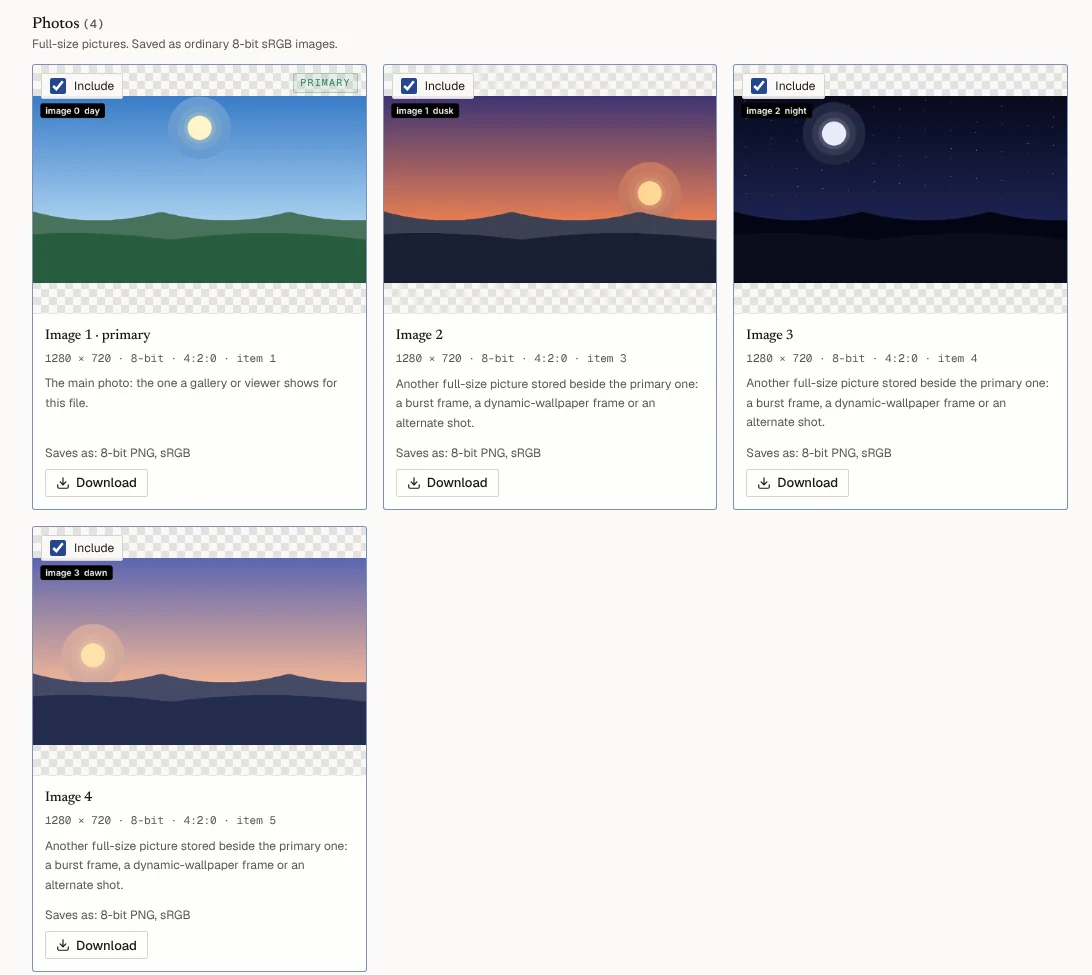
Our script, scripts/benchmarks/heic-dynamic-wallpaper.py in the site's repository, draws four landscapes and writes them with pillow-heif (libheif 1.23.4, x265). The first image is the primary one, and only it carries the XMP, which is how wallpapper lays it out. The three files below are CC0, like our other sample files, and are small enough to read in any tool here:
| File | Images | Schedule |
|---|---|---|
| synthetic-solar.heic (62.2 KB) | 4: day, dusk, night, dawn | solar: sun altitude and azimuth per image, plus ap (light 0, dark 2) |
| synthetic-time.heic (62.1 KB) | 4: the same four | h24: 12:00, 18:00, 00:00, 06:00, plus ap |
| synthetic-light-dark.heic (32.7 KB) | 2: day, night | apr: light 0, dark 1 |


Synthetic pictures, 1,280 × 720 at HEIC quality 70; real wallpapers are much larger. They are meant for testing readers, not for decorating a 5K display.
To check them we ran timewall 2.1.0, which we built from source on 2026-10-12. Its info command read all three: it reported the schedule type, four images, azimuth and altitude pairs matching what we wrote, the times 00:00, 06:00, 12:00 and 18:00, and light 0 and dark 2. A plain multi-image HEIC with no apple_desktop attribute (our burst sample) makes it stop with “unexpected XMP blocks number: 0”. So a second implementation can read the files. Whether macOS can is the part we could not test.
If you do install one on a Mac, Apple's guide for the current macOS says to open Wallpaper settings, scroll to Your Photos, click Add Photo and choose an image file. A person who published a set of Tahoe wallpapers advised the same route and warned against setting the file from Preview or the menu bar, which “sometimes won't preserve its dynamic behaviour”. That is one person's advice, not Apple's.
Does a HEIC dynamic wallpaper work on Windows 11, Linux, Android or iPhone?
| System | What we found | Not verified |
|---|---|---|
| Mac | Apple's Mac guide describes dynamic wallpapers and the Add Photo route for your own pictures. | Whether a file we or you build is accepted. No Mac here |
| Windows 10 and 11 | Windows needs Microsoft's HEIF Image Extension and HEVC Video Extensions to show a .heic at all. The WinDynamicDesktop project, a port of the Mojave feature, uses its own JSON theme plus separate JPEG or PNG images, and its wiki says to convert macOS .heic files to JPEG first. | Whether Windows lets you set a multi-image .heic as the background, and which image it would use. Microsoft's background page lists no formats |
| Linux | timewall reads original macOS wallpapers: schedule, preview, unpack, and set for many desktops. Needs libheif 1.19.7 or later, per its README. We ran info on our files. | Pixel decoding and set: the libheif in our build had no HEVC decoder. See HEIC on Linux |
| Android | Nothing in the pages we opened. | Everything: no documentation found, nothing tested |
| iPhone | Apple's iPhone guide lists Photos, Emoji, Color and the featured sets such as Weather and Astronomy. Live Photo wallpapers need iOS 17 or later. | Whether an iPhone reads the apple_desktop note. We found no Apple page that says so |
Microsoft Store listing for the HEIF Image Extension: the HEVC Video Extensions package must be installed to view .heic, .hif and .heif images. Apple pages checked 2026-10-12.
For Windows, the practical route is to extract the frames with Extract Images, or convert the whole thing with HEIC to JPG, and then build a WinDynamicDesktop theme or a normal slideshow from the pictures. You have to rebuild the schedule yourself, because that project does not read it from the HEIC. We did not build or test a theme.
Why do I only see one image when I open a dynamic wallpaper?
A HEIF file names one item as the primary image, in a box called pitm, and most software shows that one. libheif's own README starts its example by loading “the primary image”. We checked it three ways. The Inspector marks image 1 as primary. Our HEIC to JPG tool, given the solar file, returned one JPEG, which matched image 0 (the day scene) within 0.4 levels of 255 on average and differed from the other three by 36 to 105. Pillow's HEIF plugin opened the file with primary index 0. So an app that does not know about the apple_desktop note shows the day picture and nothing else.
Which image is primary matters on a Mac too: wallpapper's README describes isPrimary as marking “the preview image”. For the same reason a plain burst, an HDR file with extra frames and a dynamic wallpaper all look alike to a viewer. Only the XMP tells them apart.
Is a live wallpaper the same thing?
No. A Live Photo wallpaper on an iPhone is a still plus a short video clip. Apple says that from iOS 17 you can choose a Live Photo for the Lock Screen so that it “plays whenever you wake up your device”. A Live Photo is stored as a HEIC and a separate .MOV, not as many stills with a schedule; see Live Photos and HEIC. A macOS dynamic wallpaper does not animate: it shows one still and changes it.
Where can I download HEIC wallpapers?
Apple's own dynamic wallpapers are built into macOS, and you pick them in System Settings > Wallpaper. We do not recommend or vouch for third-party download sites. Individual designers publish sets, such as the Tahoe day/night and time-of-day files that BasicAppleGuy posted in August 2025; we only read that page, we did not install them. Treat a downloaded .heic like any file from the internet: inspect it first, as above.
If you only want a still HEIC as a Windows 11 wallpaper, convert it to JPG with HEIC to JPG rather than hunting for codecs. Our converters take the primary image and discard the rest, which is what you want for a still.
How we tested
Files. scripts/benchmarks/heic-dynamic-wallpaper.py draws four 1,280 × 720 scenes with Pillow and writes three files with pillow-heif 1.8.0 (libheif 1.23.4, x265 4.2): save_all with four images (or two), the first as primary, an XMP packet attached to that first image only, and an apple_desktop:solar, :h24 or :apr attribute holding base64(plistlib.dumps(dict, fmt=FMT_BINARY)). Then it reads each file back with a separate regular-expression parser and compares the decoded plist with what it wrote. The key names and layout come from wallpapper's ImageMetadataGenerator.swift and timewall's properties.rs, read in the repositories on 2026-10-12.
Layout check. The plists decode to the same shape as the ones in timewall's test files (ap with d and l, plus si or ti), and in those files too the XMP is a hidden application/rdf+xml item attached with cdsc to the first image. We do not know which tool wrote those files.
Readers. timewall 2.1.0, built with cargo and its bundled libheif 1.21.2 (no HEVC decoder, so metadata only); the Inspector, Metadata Viewer, Structure Viewer, Extract Images and HEIC to JPG on this site, driven with Playwright and Chromium. Not done: opening a file on macOS, Windows, Android or iOS; reading a genuine Apple wallpaper; any claim about how macOS picks frames.
Frequently asked questions
Try it yourself
Related reading
Sources
- Customize the wallpaper on your Mac — Apple Support (Mac User Guide), checked
- Change the wallpaper on iPhone — Apple Support (iPhone User Guide), checked
- Set a Live Photo as your Lock Screen wallpaper on your iPhone — Apple Support, checked
- macOS Dynamic Desktop — NSHipster (Mattt), 1 October 2018, checked
- What are those huge files doing in Mojave's Desktop Pictures? — The Eclectic Light Company (hoakley), 26 November 2018, checked
- How to Create Mojave's True Dynamic Desktops with GraphicConverter — TidBITS (Adam Engst), 10 October 2018, checked
- wallpapper: console application for creating dynamic wallpapers for macOS — Marcin Czachurski (GitHub, MIT), checked
- timewall: Apple dynamic HEIF wallpapers on GNU/Linux — Bazyli Cyran (GitHub, MIT), checked
- WinDynamicDesktop — Timothy Johnson (GitHub, MPL-2.0), checked
- Creating custom themes (WinDynamicDesktop wiki) — WinDynamicDesktop project (GitHub wiki), checked
- Dynaper - Dynamic Wallpapers — Mac App Store, checked
- Dynamic Tahoe Wallpapers — BasicAppleGuy, checked
- HEIF Image Extension (Microsoft Store listing) — Microsoft Store, checked
- libheif — HEIF and AVIF decoder and encoder — strukturag (GitHub), checked
How we research and correct: editorial policy.
Written by the heic.fyi team · Last updated: · Spotted an error? Tell us.